
About User Verification
Build consistent verification flows that balance compliance and conversion.
Use User Verification to confirm users are genuine and assess risk before granting access to your products or services.
Combine identity checks, biometrics, database validation, screening, and other verification methods into workflows tailored to your markets and requirements, helping you reduce fraud, improve onboarding, and meet KYC, AML and other compliance obligations.
Sumsub offers an all-in-one verification platform featuring customizable solutions for:
- Identity verification
- Address verification
- Screening, risk and monitoring
- Payment Verification
- Reusable Identity
- Configuration and automation
- Results and operations
Benefits of Sumsub User Verification
Balance uncompromising compliance with a seamless, high-converting onboarding experience using Sumsub:
- Instantly verify 14,000+ document types from 220+ countries and territories.
- Handle routine compliance steps with smart automation, cutting manual review workloads by up to 94%.
- Break down communication barriers with interfaces supported in 50+ languages.
- Onboard legitimate applicants in around 20 seconds on average and achieve an average pass rate of 90% due to smooth user experience.
How Sumsub User Verification works
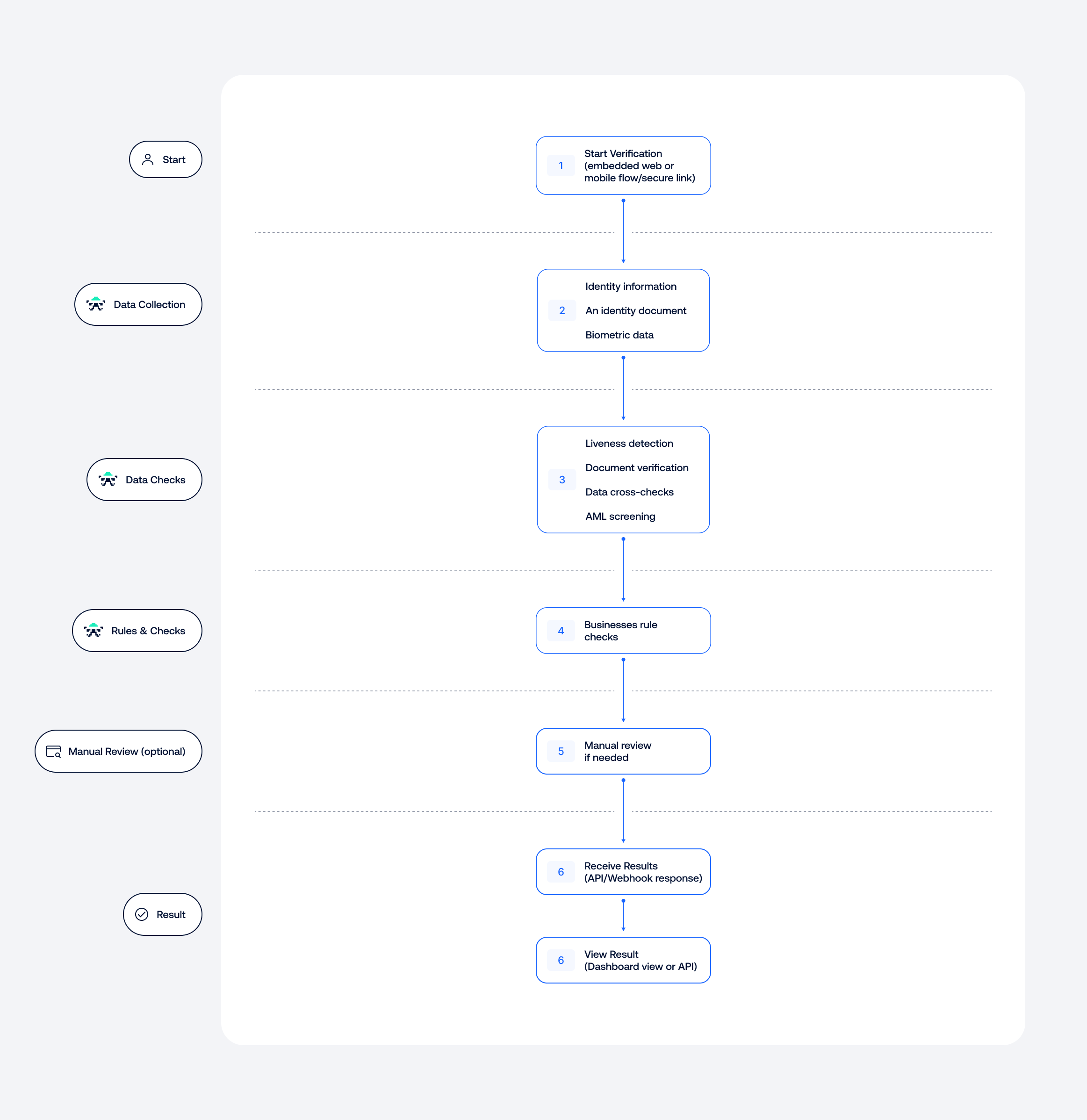
The scheme below explains the main user verification steps.
Step 1: Data collection
The applicant starts verification through an embedded web or mobile flow, or via a secure verification link.
Depending on the workflow, they may be asked to provide the following:
- Identity information, such as their name, date of birth, and ID number.
- An identity document, such as a passport, driver's license, or national ID card
Biometric data, such as a selfie or liveness check.
Information can be entered by the applicant or extracted automatically from their identity document.
Step 2: Checks and decisioning
The collected data is processed using the checks and rules configured in your workflow.
These may include:
- Liveness detection to identify deepfakes and impersonation attempts.
- Document verification to check authenticity, validity, and security features.
- Data cross-checks to identify mismatches between sources.
- AML screening against sanctions, PEP, and adverse media databases.
The results are evaluated against your business rules. Cases requiring further investigation can be routed for manual review.
Step 3: Verification result
Once all required checks are complete, a final result is generated. You can view it in the dashboard or receive it through an API response or webhook.
User Verification use cases
There is no one-size-fits-all approach to verification. The right checks depend on your regulatory requirements, risk appetite, and the level of assurance needed for each user or action.
Sumsub lets you combine verification methods and build workflows that balance security, compliance, and user experience. Here are some common examples.
| New user onboarding | Non-Doc onboarding | Re-verification | High-assurance verification | Regulated identity verification |
|---|---|---|---|---|
| Verify applicants using standard government-issued IDs, a selfie, and automated checks. | Verify identity details such as name, date of birth, and address against trusted government, credit bureau, and utility databases, without requiring an identity document. | Quickly reconfirm an existing user's identity when it matters—after inactivity, before high-risk actions, or as part of scheduled reviews, with minimal friction. | Add greater assurance to high-risk accounts and transactions by combining document verification, liveness detection, and NFC chip checks. | Meet strict regional requirements, including BaFin and SEPBLAC, with high-assurance video identification and legally binding electronic signatures. |
Get started with User Verification
Getting started with Sumsub user verification is simple and doesn’t require any coding. All you need to do is set up your integration and configure the verification logic in the Dashboard.
The scheme below explains how to set up User Verification.
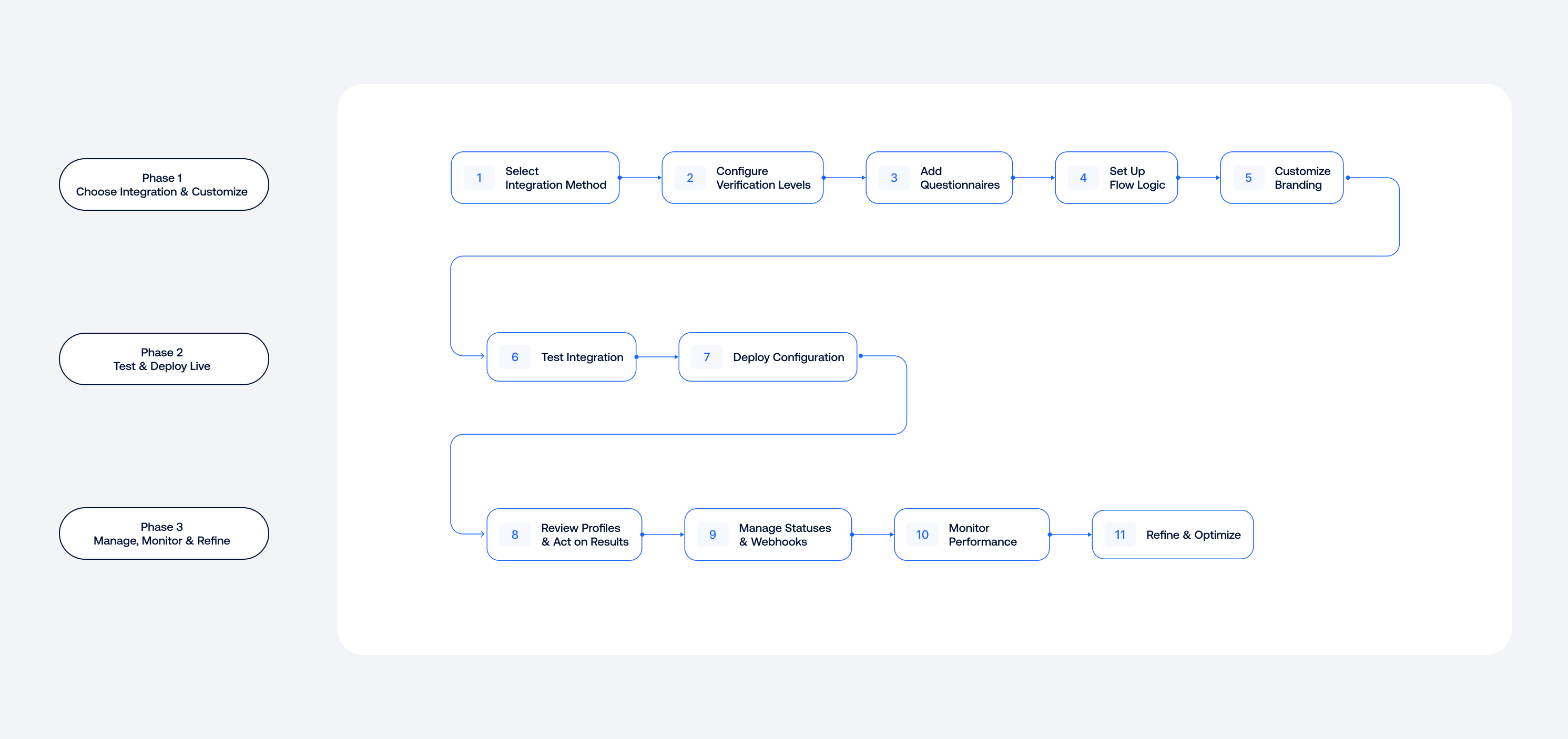
- Choose WebSDK, MobileSDK, or API and initiate the integration.
- Configure at least one verification level to select the checks your applicants will pass.
- Add questionnaires to collect additional information.
- Set up the verification flow.
- Customize the look and feel of your applicant’s journey.
- Test your integration with premade document templates to ensure all steps are set up correctly and then go live.
- Review applicant profiles and act on verification results.
- Manage verification statuses, associated webhooks, and rejection labels.
- Analyze your product performance data and applicant activities.
To learn more about the key steps, refer to the articles below.
Take our free User Verification course developed by industry experts.
Create custom user verification flows
Below is an overview of Sumsub’s key verification features and how they work to help you build an optimized, compliant workflow.
Identity verification
Address verification
Reusable identity
Payment verification
Screening and risk monitoring
Updated 2 days ago