
Reusable KYC via API
Enable secure reuse of existing KYC data via API.
Reusable KYC via API will always recheck applicant data to make sure it meets the recipient level requirements. It is recommended for clients requiring a regulatory compliant KYC on the recipient side.
ImportantReusable KYC via API is now a legacy service and is in maintenance mode. It will continue to receive sustaining support and remain operational, but no new features or enhancements are planned.
For new data reuse integrations, use the Reusable KYC Share service.
Once clients agree to share verification data, they become the donor and recipient. You can have an unlimited number of sharing partners, and Sumsub also supports bidirectional sharing.
How Reusable KYC via API works
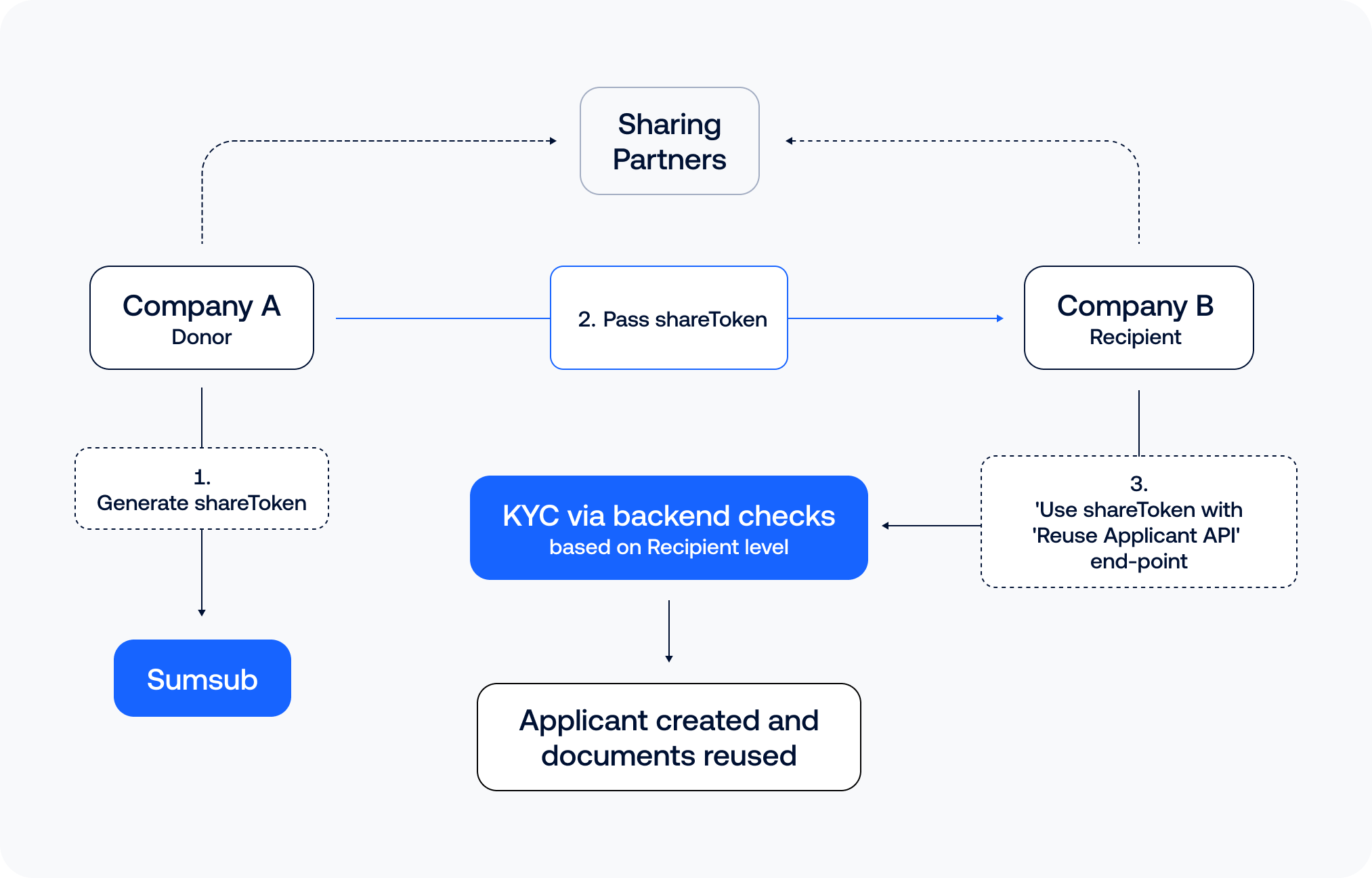
Our Reusable KYC via API solution uses a share token based approach to transfer verified applicant data from the donor to the recipient. Upon receipt, all shared data is always rechecked against the specific level settings and requirements of the recipient.
For example, the identity document will be rechecked to ensure it matches the accepted document type, remains valid (i.e., not expired), and, if required by the recipient’s verification level, applicable AML checks are run again. This approach guarantees that this will count as a KYC for the recipient by regulatory standards and meets the specific compliance requirements of our clients.
NoteWhen AML checks are run again on reuse, the applicant is held in pending review until the AML screening resolves before proceeding to the next workflow level.
If the screening is clear, the applicant proceeds immediately.
- If it generates a manual review task, the transition is paused until the task is approved.
- If the applicant is rejected as a result, they do not proceed.
Only applicant data that is reusable under the recipient’s verification level settings is transferred, ensuring full compliance with end-user data privacy. Three main cases:
- Approved applicant. If the donor applicant profile contains enough data to meet requirements of all recipient verification steps, the system completes all checks and assigns the applicant an Approved status.
- Documents requested. If the donor applicant profile contains data that meets some, but not all of the requirements of recipient verification steps, then the applicant will be assigned with a Documents requested status to fulfill the remaining steps at a later point.
- No applicant created. In the case the applicant data from the donor meets none of the requirements of the recipient verification steps, an applicant will not be created and no data will be copied. We will return an error with information on why no data was transferred.
NoteWe do not require Liveness check for Reusable KYC via API. If the provided recipient’s verification level includes a liveness step, the system reuses the selfie from the donor applicant profile to perform the check again.
If no selfie is available, the system sets the applicant status to
documents requested, so the applicant can complete liveness at a later point.
Reusable KYC via API involves the following steps:
- Donor generates a new share token for a specific applicant. To generate a share token, use this API method:
curl --request POST \
     --url https://api.sumsub.com/resources/accessTokens/shareToken \
     --header 'content-type: application/json' \
     --data '
            {
              "applicantId": "63e092c51b7b4030f2e01154",
              "forClientId": "CoolCoinLtd",
              "ttlInSecs": "600"
            }
'- Donor passes the share token to the recipient.
- Recipient includes the share token when using this API method to attempt to reuse verification data from the donor.
curl -X POST \
'https://api.sumsub.com/resources/api/reusableIdentity/reuse?shareToken=_act-jwt-eyJhbGciOiJub25lIn0.eyJqdGkiOiJfYWN0LTE3YjM5YTljLWRhOWUtNGY2MS04Y2ZjLTYwNzViNWM2NDk5MSIsInVybCI6Imh0dHA6Ly9sb2NhbGhvc3Q6ODA5MCJ9.&levelName=liveness-id-poa'| Name | Type | Required | Description |
|---|---|---|---|
shareToken | String | Yes | A token used to access the shared KYC data. |
userId | String | No | External user identifier. |
levelName | String | Yes | The name of the level on the recipient's side for which the KYC data is being reused. |
sourceKey | String | No | One of the source keys available on the recipient side. Passing an unknown value will return a validation error: Source key 'key_name' is not allowed for license key cross. |
Response
If at least one document or part of the applicant’s data meets the requirements of the recipient’s level, the system creates an applicant on the recipient side and reuses all eligible documents. In this case the applicant profile data will be returned:
{
    "id": "689223ed75b5d1bc2bb38gdg",
    "createdAt": "2025-08-05 15:31:57",
    "key": "UUBSGJZXJDFXXW",
    "clientId": "DonorCompany"
…
}
If no documents meet the recipient’s level requirements, the system returns an error message and does not create an applicant. See this article for the full list of possible errors.
{
  "code": 400,
    "errorCode": 10513,
    "errorName": "reusable-kyc-not-compatible-doc-type",
    "description": "Not Reusable KYC for level: id-liveness-preview",
    "type": "de.smtdp.commons.service.exceptions.ServiceException"
}
Enable Reusable KYC for API
The following is a sequence of steps to be taken to turn on the data-sharing functionality.
Step 1: Sign contract
Contact our support team at [email protected] so that the donor and recipient can each sign a one-time contract to use the service. You will not have to sign any additional documents.
NoteSelf-service clients do not need to sign any contracts or additional agreements. To start using Reusable KYC, self-service clients only need to connect as partners, either as a donor or a recipient.
Step 2: Add sharing partners
Once the service is enabled, you can add sharing partners directly in the Dashboard. For more instructions, see this article.
Step 3: Use share token
Implement the share token approach.
ImportantUsers need the Share applicants data permission granted to their role to generate or ingest a share token for the Reusable KYC service. This permission allows users to share applicants’ data with other parties.
Every time the recipient client uses Reusable KYC for a streamlined verification, the following steps should be completed:
- Donor generates a new share token for a specific applicant. To generate a share token, use this API method:
curl --request POST \
     --url https://api.sumsub.com/resources/accessTokens/shareToken \
     --header 'content-type: application/json' \
     --data '
            {
              "applicantId": "63e092c51b7b4030f2e01154",
              "forClientId": "CoolCoinLtd",
              "ttlInSecs": "600"
            }
'| Name | Type | Required | Description |
|---|---|---|---|
applicantId | String | Yes | Applicant ID in Donor company. |
forClientId | String | Yes | Client ID for Recipient. You can find your clientId in the Dashboard in the applicant profile (field Created for) and in the response (field clientId). |
ttlInSecs | Integer | No | Time to live in seconds. Default 1200. |
Response
A new share token is returned.
{
  "token": "eyJhbGciOiJub25lIn0.eyJqdGkiOiJfYWN0LTZmODI2ZTU0LTE2MzctNDViMS05NzMyLWY1MjZiN2YxNWE3YyIsInVybCI6Imh0dHBzOi8vYXBpLnN1bXN1Yi5jb20ifQ.",
  "forClientId": "CoolCoinLtd"
}
InfoMake sure your integration code does not validate or analyze the access token content, as the format is not fixed and may undergo further changes in the future. The token must be treated as an arbitrary string with the maximum length of 1KB.
- Donor passes the share token to the recipient.
- Recipient includes the share token when generating an access token, which will be automatically used to start a Reusable KYC flow where possible, whenever that access token is used. For more information on how to generate an access token, see this article.
Request example:
curl --request POST \
     --url https://api.sumsub.com/resources/accessTokens/sdk \
     --header 'content-type: application/json' \
     --data '
            {
              "applicantIdentifiers": {
                "email": "[email protected]",
                "phone": "555-1111"
              },
              "ttlInSecs": 600,
              "userId": "johndoeID",
              "levelName": "basic-kyc-level",
              "shareToken": "eyJhbGciOiJub25lIn0.eyJqdGkiOiJfYWN0LTZmODI2ZTU0LTE2MzctNDViMS05NzMyLWY1MjZiN2YxNWE3YyIsInVybCI6Imh0dHBzOi8vYXBpLnN1bXN1Yi5jb20ifQ.",
            }
      '
The donor and recipient must coordinate on the timing and method of generating and providing the share token to ensure that it corresponds to the same applicant across both platforms.
NoteTo track applicant share token consumption, configure the applicantShareTokenConsumed and applicantShareTokenFailed webhooks.
These webhooks support applicant share tokens and Sumsub ID share tokens.
When the original (donor) applicant record can no longer be loaded, the applicantShareTokenConsumed webhook is still delivered with a reduced payload that omits applicantId.
How to test Reusable KYC via API using Preview
To simplify integration testing, use this API method to simulate the Reusable KYC via API flow. This method performs validation and preview logic only—it does not create applicants or transfer any data. You can use this method with production data.
curl -X POST \
    'https://api.sumsub.com/resources/api/reusableIdentity/reuse/preview?shareToken=_act-jwt-eyJhbGciOiJub25lIn0.eyJqdGkiOiJfYWN0LTE3YjM5YTljLWRhOWUtNGY2MS04Y2ZjLTYwNzViNWM2NDk5MSIsInVybCI6Imh0dHA6Ly9sb2NhbGhvc3Q6ODA5MCJ9.&levelName=liveness-id-poa'
This method allows you to verify that your integration is correctly set up to handle all possible responses, create applicants, and reuse documents appropriately. The method utilises the same query parameters and follows the same requirements as the live flow.
How to test Reusable KYC via API in Sandbox
You can test Reusable KYC via API in Sandbox mode without the need to create a new level. Switch to the Sandbox and use your existing level.
Before sharing agreements are set up, you can test sharing using Reusable KYC within the same key, which means your client key is both the donor and recipient.
The following is a sequence of steps to be taken to test the share token based implementation of the Reusable KYC via API in Sandbox.
Step 1: Configure Sandbox mode for verification testing
Create a verification preset and apply it to the required verification level:
- Switch to the Sandbox in the Dashboard and navigate to the Sandbox mode for verification testing page.
- Click on an existing preset or select Create new verification preset.
- Adjust the preset settings:
- Select the Automated applicant review option. In this mode, checks are performed automatically using AI.
- From the Face match drop-down list, select Always approve. This ensures the applicant's status is marked as Approved regardless of the selfie and documents used.
- Check the box Enable Reusable KYC.
- Save the preset and apply it to the relevant verification level.
Step 2: Create applicant
Create an applicant in Sandbox in your chosen level. Make sure the applicant is approved, has reusable documents, and meets the requirements of the level you want to test with.
Step 3: Generate share token
Generate a share token for the applicant using one of the following methods:
- Use this API method. Make sure to include an app token configured for the Sandbox environment in the request.
- In the Dashboard, go to the Applicants page and select the applicant of interest. In the drop-down menu on the top of the page, click Generate share token.
Step 4: Reuse applicant via API
Use this API method and include an app token configured for the Sandbox environment in the request.
This should now trigger the Reusable KYC via API flow and create an applicant. You can reuse any documents with your client key acting as both the donor and recipient.
Reuse of applicant data
Sumsub supports reuse of applicant data. When reuse is applied, we copy and reuse any applicant fields that match between the donor applicant and the recipient’s provided level.
Note
- Only fields supported by the provided level are reused.
- Custom fields are not copied or reused.
Reuse of email and phone confirmation steps
If the donor applicant has already confirmed an email address and/or phone number during a level (via level steps), and the recipient’s provided level includes the same email/phone confirmation steps, we reuse the donor’s confirmation results.
Recipient applicant will appear with confirmed email and/or phone without requiring the end user to complete OTP verification again. It works as follows:
- The email/phone value is copied from the donor applicant to the recipient applicant.
- The corresponding email/phone check is also copied from the donor applicant to the recipient applicant (when the recipient level includes the same confirmation steps).
AttentionThe email/phone value is copied from the donor applicant to the recipient applicant even if the recipient level does not include email and phone confirmation steps.
Reuse of questionnaires
Reusable KYC via API supports reuse of questionnaires. The system reuses individual question responses when the donor and recipient questionnaires match on structure and answer options.
To reuse a question response, all of the following must match:
- Question and section IDs. The question ID and section ID on the donor questionnaire must exactly match the question ID and section ID on the recipient questionnaire.
- Response value. The response value from the donor applicant must exactly match one of the response options configured for the same question ID on the recipient side.
When these conditions are met, the system copies the donor’s response to the corresponding question in the recipient questionnaire. If the system can copy responses for all required questions in a questionnaire, it treats that questionnaire as completed.
NoteThe questionnaire step only gets the Approved status when the applicant itself reaches the approved state.
To make sure the donor and recipient questionnaires match, we recommend using the Export and Import questionnaire functionality available in the Dashboard.
The following steps describe how to align the questionnaires on the donor side:
- In the Dashboard, open Integrations and go to the Questionnaires section.
- Find the questionnaire that you want to reuse.
- Open the actions menu on the right and click Export.
- Save the exported questionnaire data by clicking the Copy to clipboard button in the pop-up window.
- Send the export to the recipient.
The following steps describe how to align the questionnaires on the recipient side:
- In the Dashboard open Integrations and go to the Questionnaires section.
- Click Import questionnaire.
- Paste the questionnaire data you received previously and click the Create questionnaire button.
- Add the imported questionnaire to the relevant verification level. For more instructions, see this article.
Once these steps are completed, the donor and recipient questionnaires will contain the same data.
Reusable KYC via API with Workflow Builder
Reusable KYC via API supports document and data reuse across all verification levels of a Workflow Builder flow, not just the initial level. This includes documents such as proof of identity, proof of address, and liveness checks, as well as applicant data, email, phone number, and questionnaire data.
As an applicant moves through the workflow, the system re-runs the reuse logic at each level and reuses all relevant documents and data for the specific stage.
NoteThe donor selected for the first workflow level remains the same throughout the entire workflow. The system does not switch to a different donor in the middle of the workflow. Donor selection prioritizes applicants with the most documents over the most recently verified applicants.
The applicant can proceed to the next workflow level only after they successfully pass the current level and all required data matches correctly.
Automated reuse processing expires 60 minutes after applicant creation. If the applicant does not move through all workflow levels within this period, the system stops applying reuse logic automatically to the remaining levels. The applicant can then continue with the general KYC flow.
Trigger Reusable KYC in Workflow Builder
To activate reuse in a Workflow Builder:
- Set up a verification level.
- Build a workflow using these levels in Workflow Builder.
- Generate a permalink for the first workflow level.
- Include a share token or email identifier in the permalink.
- Send the permalink to the applicant.
- Ask the applicant to start verification through this permalink.
- Once the applicant is approved at the first level, the workflow automatically moves them to the next level and attempts to run Reusable KYC again. This repeats for each subsequent level in the workflow.
The system activates reuse only when the applicant starts the first workflow level through a permalink with a share token or email identifier. If you launch the workflow directly from the Dashboard, the system does not activate reuse.
Updated 2 days ago