
Handle Penny Drop Verification statuses
Track and handle payment and refund statuses within Penny Drop Verification.
This article explains how to interpret and handle Penny Drop Verification results. It describes the statuses a payment goes through, how they map to the check result, and the refund statuses for the Penny Drop Verification Refund product.
Understand the payment flow
The diagram shows the statuses a payment can go through, from the bank redirect to the final result. For the check result of each status, see this section.
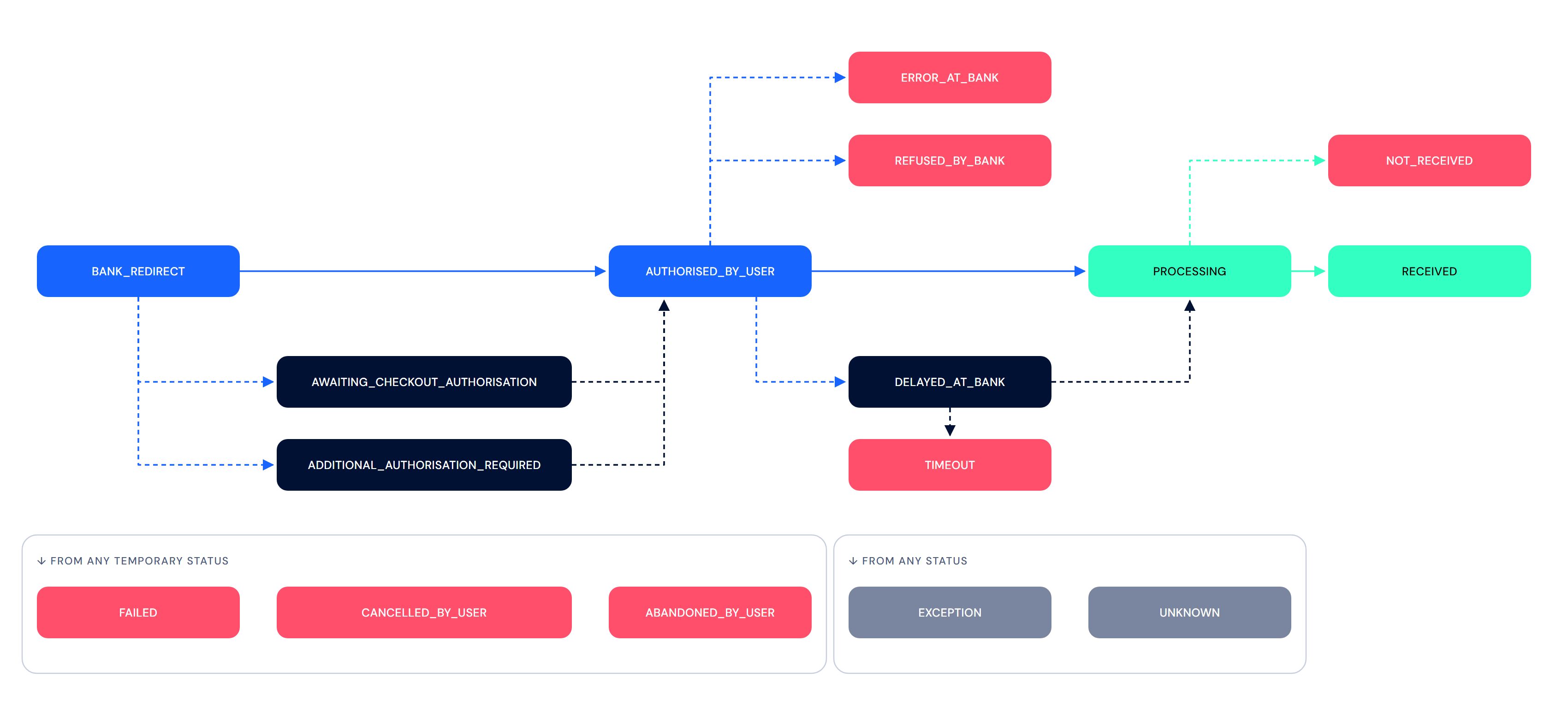
Handle payment statuses
Sumsub returns the payment status (status) and the check result (answer) in the following combinations:
- PENDING + YELLOW: the payment is still in progress. Wait for the final status.
- RECEIVED + GREEN: the funds were received. The check is successfully completed.
- FAILED + RED: the payment failed or was cancelled. The check is not completed. The applicant needs to restart the verification.
- UNKNOWN + ERROR: the check was not completed due to a technical error. The applicant needs to restart the verification.
The following table describes each payment status and its check result:
PISP payment status |
Sumsub payment status |
Check result |
Description |
Sumsub UI message |
|---|---|---|---|---|
BANK_REDIRECT |
PENDING | YELLOW | Applicant was redirected to the selected banking platform for authentication and payment confirmation. |
Verification is in progress Please keep this tab open. Closing it will require restarting the process. If you are not redirected automatically, Click here. |
AWAITING_CHECKOUT_AUTHORISATION |
PENDING | YELLOW |
Applicant entered their login credentials on the PISP's checkout page and is currently at a stage preceding either the selection of the authentication method or the input of the authentication credentials. This status is applicable to banks that require an embedded flow within the PISP. |
Verify with your bank Please keep this tab open. Closing it will require restarting the process. If you are not redirected automatically, Click here. |
ADDITIONAL_AUTHORISATION_REQUIRED |
PENDING | YELLOW |
Applicant must complete additional authorization. This is common for business accounts where more than one person must authorize a payment. |
Verify with your bank Please keep this tab open. Closing it will require restarting the process. If you are not redirected automatically, Click here. |
AUTHORISED_BY_USER |
PENDING | YELLOW | Applicant successfully authorized the payment. |
Authorization successful You may close this page and return to the original verification session. |
DELAYED_AT_BANK |
PENDING | YELLOW | Sending bank is still processing the payment. |
We're verifying your information This might take a bit. Feel free to leave this page and check later. If you need any assistance, contact Support. |
PROCESSING |
PENDING | YELLOW | Sending bank successfully issued the payment. The funds have not reached the recipient bank yet. |
Verify with your bank Verifying your information. Please wait. |
RECEIVED |
RECEIVED | GREEN | Transferred funds successfully arrived at the recipient bank. |
Your profile has been verified You may close this page. |
NOT_RECEIVED |
FAILED | RED | Sending bank confirmed the payment, but the funds did not reach the recipient bank within 7 days. |
Payment not received We were unable to verify your account as the transferred funds did not reach the recipient bank in time. Please restart the verification process. You may also select a different banking platform. |
ERROR_AT_BANK |
FAILED | RED | Sending bank ran into an unexpected error. |
Bank couldn't process payment We were unable to verify your account as the banking institution ran into an unexpected error. Please restart the verification process. You may also select a different banking platform. |
REFUSED_BY_BANK |
FAILED | RED |
Sending bank refused to process the payment. This can occur due to insufficient available balance, transaction limits, or security settings. |
Payment declined at bank We were unable to verify your account as the banking institution rejected the transaction. Please check your account limits, security settings, or available balance, and restart the verification process. You may also select a different banking platform. |
FAILED |
FAILED | RED | Payment request could not be completed due to an unexpected error in the technical infrastructure. |
Bank couldn't process payment We were unable to verify your account as the banking institution ran into an unexpected error. Please restart the verification process. You may also select a different banking platform. |
CANCELLED_BY_USER |
FAILED | RED | Applicant cancelled the payment process. |
Payment cancelled We were unable to verify your account as the payment was cancelled. Please restart the verification process. |
ABANDONED_BY_USER |
FAILED | RED | Applicant did not perform any actions for over 30 minutes and the session was automatically cancelled. |
Payment incomplete We were unable to verify your account as the payment was not completed in time. Please restart the verification process. |
EXCEPTION |
UNKNOWN | ERROR | Payment request could not be completed due to an unexpected error in the technical infrastructure. |
Bank couldn't process payment We were unable to verify your account as the banking institution ran into an unexpected error. Please restart the verification process. You may also select a different banking platform. |
UNKNOWN |
UNKNOWN | ERROR | Payment request could not be completed due to an unexpected error in the technical infrastructure. |
Bank couldn't process payment We were unable to verify your account as the banking institution ran into an unexpected error. Please restart the verification process. You may also select a different banking platform. |
TIMEOUT |
TIMEOUT | ERROR | Payment request could not completed within 48 hours. The process should be reinitiated. |
Bank couldn't process payment We were unable to verify your account as the banking institution ran into an unexpected error. Please restart the verification process. You may also select a different banking platform. |
Handle refund statuses
If you use the Penny Drop Verification Refund product, the payment amount is refunded to the applicant after the check. The refund has its own statuses, which are tracked separately from the payment statuses.
The following table describes each refund status:
PISP refund status |
Sumsub refund status |
Description |
|---|---|---|
REFUND_CREATED |
CREATED | Refund request was created. |
REFUND_APPROVED |
CREATED | Refund request was approved and will be initiated. |
REFUND_PROCESSING |
PROCESSING | Refund was initiated. |
REFUND_CONFIRMED |
COMPLETED | Refund was sent to the applicant's bank. |
REFUND_FAILED |
FAILED | Refund request could not be completed due to an unexpected error in the technical infrastructure. The process should be reinitiated manually by Sumsub. |
UNKNOWN |
UNKNOWN | Refund request could not be completed due to an unexpected error in the technical infrastructure. The process should be reinitiated manually by Sumsub. |
ImportantIf a refund fails, contact Technical Support or your Customer Success Manager to process it manually.
Handle payment and refund statuses separately. For example, the API response may contain the following values:
{
  "status": "RECEIVED",
  "originalStatus": "RECEIVED",
  "refundStatus": "COMPLETED",
  "originalRefundStatus": "REFUND_CONFIRMED"
}
In this case, the payment was received first, and the refund was completed afterwards.
Updated 2 days ago