
Manage Database Products and Solutions
Seamlessly manage all active and available Database Products.
The Database products tab in the Dashboard allows you to access both Active products and Available products for data verification services offered by Sumsub. The two sections provide a detailed overview of the products already enabled on your account and those available for activation.
At Sumsub, we provide a range of Database Solutions to address the relevant client use cases:
- Non-Doc Identity Verification — document-free identity verification solution.
- Non-Doc Address Verification — document-free address verification solution.
- Database Validation — identity document and personal data validation solution.
- Penny Drop Verification — document-free payment verification solution.
- Bank Account Verification — document-free bank account verification solution.
- QES Verification — qualified electronic signature-based onboarding solution.
Monitor Active products tab content
The Active products tab displays data verification services for each country currently enabled on your account.
Each of them contains an operability status as well as a 31-day history of uptime rates. You can also view the status within each individual day.
The possible statuses are as follows:
- Online — source is operating normally with high uptime and successful responses. No significant issues detected.
- Unstable — source is experiencing intermittent issues, with occasional failures or degraded performance. It is still operational but may be unreliable at times.
- Offline — source is currently unavailable or failing frequently. Most requests are unsuccessful, or the service is not responding.
- No data — there is not enough data to determine the status of the source. Activity is too low to draw reliable conclusions.
NoteTo receive updates on active Database Products status changes, use the Notifications button. There, you can configure Email and/or Dashboard notifications that will help you stay closely informed about service uptime issues and their resolution.
Manage Available products tab content
On the Available products tab, you can manage all data verification services by country that can be turned on/off for your account. You can expand both the Country and Product sections to learn about the product functionality and benefits, as well as its activation status (Enabled or Disabled).
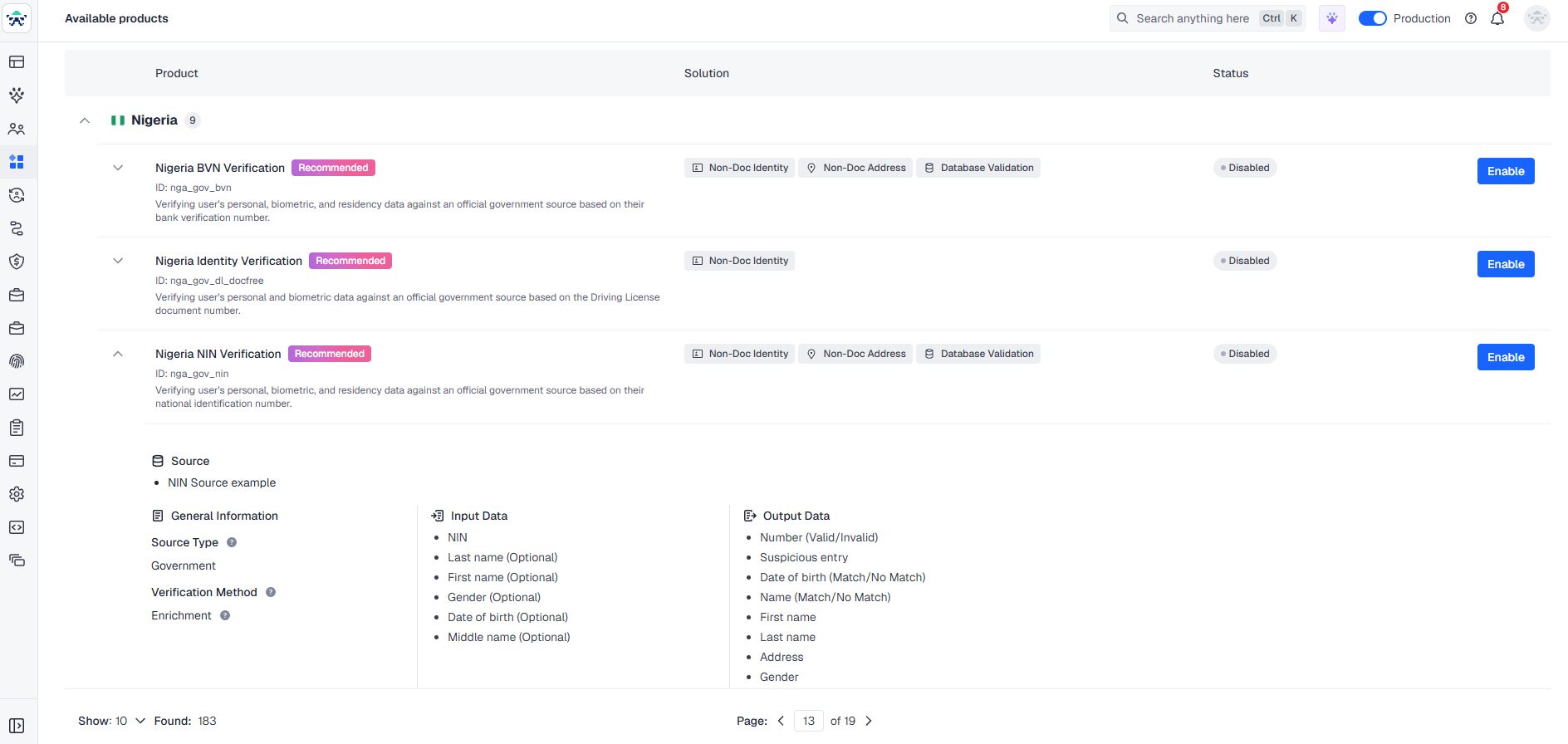
The following table provides descriptions of the available columns and fields.
|
Attribute |
Description |
|---|---|
|
Columns |
|
|
Product |
Unique Database Product name and ID for the selected country, along with a brief description of the functionality. |
|
Solution |
One or multiple Database Solutions that are enabled by a specific product. These are designed to address relevant client use cases. |
|
Status |
Indicates whether the specific Database Product is enabled or disabled. |
|
Fields |
|
|
Source type |
Database type(s) leveraged in user data verification, including:
|
|
Source |
Specific database(s) leveraged in user data verification. |
|
Verification method |
Methodology that is applied in user data verification. It specifies both how the data is checked against the applicable source(s) and what is the expected output. |
|
Input data |
Data that is required to perform the verification. |
|
Output data |
Result that is returned in case of a successful verification. |
The Enable button will create a service activation request on your account for Sumsub’s Customer Success team. In turn, the Disable button gives you control to turn off any data verification services you no longer require.
Updated about 1 month ago