
Migrate from Veriff to Sumsub
Transform and import your applicant data into Sumsub.
You can move applicant data from Veriff to Sumsub by exporting verification records, transforming them into Sumsub archive format, and importing one archive per applicant.
The current migration flow covers basic-kyc-level verification level with the Identity document and Selfie steps.
NoteIf the verification setup includes additional checks or a custom structure, contact your CSM or Sumsub support before starting the migration.
How migration to Sumsub works
The migration includes three stages:
- Export data from Veriff. Extract verification session data, including applicant details, documents, media files, and review results.
- Transform the data. Map Veriff fields to Sumsub fields and reorganize the exported files into the required archive structure.
- Import the archive into Sumsub. Upload one archive per applicant through the Sumsub import API method.
The Sumsub import API allows 10 requests per 10 seconds. When migrating large volumes, batch your requests accordingly.
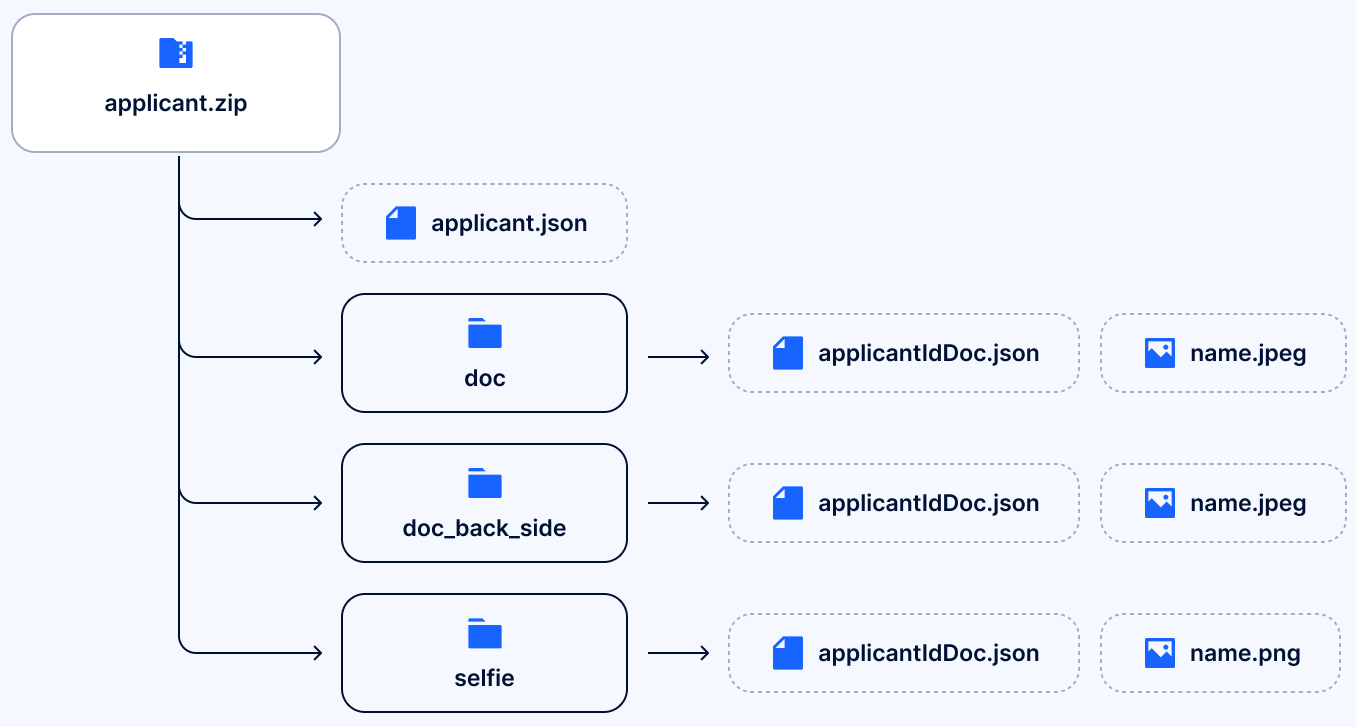
Each verification session from Veriff should be transformed into a separate Sumsub archive for the corresponding applicant. Each archive must contain:
applicant.json.doc/folder.doc_back_side/folder, when applicable.selfie/folder.
Each media folder contains:
applicantIdDoc.json.- Corresponding image file.
A typical Sumsub archive structure looks like this:
Transform applicant data
Veriff exported verification session usually includes the following data sections:
person— Name, DoB, gender, nationality, address.document— Document number, type, country, validity dates.media— Face images, document front/back, selfie video.insights— Fraud, biometric, and document check results.
Note that insights data is specific to Veriff and is not imported into Sumsub.
A Veriff export may also contain:
- Processed document images.
- Processed face image.
- Raw capture variants.
- Selfie video.
- Session response payload.
ImportantThe field mappings in this article are based on the current source provider API. Because provider API can change over time, verify your export data against the latest API reference before starting the migration.
Confirm that the field names, values, and response structure match, and validate the mapping on a small sample before processing the full dataset.
Person to applicant mapping
To learn what data you need to populate applicant-level fields in Sumsub applicant.json, refer to the table below.
| Veriff field | Sumsub field | Notes |
|---|---|---|
vendorData | externalUserId | Use your internal user ID. |
person.firstName.value | info.firstName | Direct mapping. |
person.lastName.value | info.lastName | Direct mapping. |
person.dateOfBirth.value | info.dob | Keep ISO format. |
person.gender.value | info.gender | Direct mapping. |
person.nationality.value | info.nationality | Convert to alpha-3. |
document.country.value | info.country | Convert to alpha-3. |
person.address.components.postcode | addresses[0].postCode | Direct mapping. |
person.address.components.city | addresses[0].town | Direct mapping. |
person.address.components.road | addresses[0].street | Direct mapping. |
person.address.components.houseNumber | addresses[0].subStreet | Direct mapping. |
ImportantVeriff uses ISO 3166-1 alpha-2 country codes such as
US,BR, andGB. Sumsub requires ISO 3166-1 alpha-3 country codes such asUSA,BRA, andGBR. Convert all country values before importing the archive.
Document to IdDoc mapping
Create document metadata files for the target media folders to add verification documents.
Do not pass Veriff document values directly into Sumsub. Convert them to the required Sumsub enums during transformation.
| Veriff field | Sumsub field | Notes |
|---|---|---|
document.type.value | idDocType | Map to Sumsub enum:
|
| — | idDocSubType | Set per folder:
|
document.country.value | country | Convert to alpha-3. |
document.number.value | number | Only in doc/ folder. |
person.firstName.value | firstName | Only in doc/ folder. |
person.lastName.value | lastName | Only in doc/ folder. |
person.dateOfBirth.value | dob | Only in doc/ folder. |
document.validFrom.value | issuedDate | Only in doc/ folder. |
document.validUntil.value | validUntil | Only in doc/ folder. |
The doc/ folder should contain the full document metadata.
The doc_back_side/ folder requires the following metadata:
idDocTypeidDocSubType: “BACK_SIDE”country
The selfie/ folder requires the following metadata:
idDocType: “SELFIE”country
Media mapping
Use processed images from Veriff and place them into the corresponding Sumsub folders. For this migration flow, import processed images only.
| Veriff media name | Target folder | Use |
|---|---|---|
document-front | doc/ | Yes |
document-back | doc_back_side/ | Yes |
face | selfie/ | Yes |
face-pre | — | No |
document-front-pre | — | No |
document-back-pre | — | No |
selfid_video | — | No |
Review status mapping
Use the Veriff review decision to populate the review block in applicant.json.
| Veriff decision | Sumsub reviewAnswer | Sumsub reviewStatus |
|---|---|---|
approved | GREEN | completed |
declined | RED | completed |
resubmission_requested | RED | completed |
expired | RED | completed |
abandoned | RED | completed |
Sample review block in applicant.json:
"review": {
    "createDate": "2025-01-15 10:30:00+0000",
    "reviewDate": "2025-01-15 10:32:45+0000",
    "levelName": "basic-kyc-level",
    "reviewStatus": "completed",
    "reviewResult": {
      "reviewAnswer": "GREEN",
      "moderationComment": "Imported from Veriff. Original decision: approved",
      "clientComment": "Veriff session: <session_id>"
    }
}
Attention
- Use
GREENonly for approved cases. Map all other listed outcomes toRED.- Confirm the exact
levelNamefrom your Sumsub dashboard.
Data transformation example
See the following examples to understand how the transformed data looks:
{
 "vendorData": "usr_xxx...",
 "data": {
  "verification": {
   "decision": "approved",
   "person": {
    "firstName": {"value":"JANE"},
    "lastName": {"value":"DOE"},
    "dateOfBirth": {"value":"1990-01-01"},
    "gender": {"value":"F"},
    "nationality": {"value":"US"}
   },
   "document": {
    "number": {"value":"D123456789"},
    "type": {"value":"id_card"},
    "country": {"value":"US"},
    "validFrom": {"value":"2020-01-01"},
    "validUntil": {"value":"2030-01-01"}
   }
  }
 }
}
{
"externalUserId": "usr_xxx...",
"info": {
"firstName": "JANE",
"lastName": "DOE",
"country": "USA",
"dob": "1990-01-01",
"gender": "F",
"nationality": "USA",
"addresses": [{
"country": "USA",
"postCode": "12345",
"town": "ANYTOWN",
"street": "MAIN ST",
"subStreet": "123"
}]
},
"review": {
"reviewStatus": "completed",
"reviewResult": {
"reviewAnswer": "GREEN",
"moderationComment":
"Imported from Veriff..."
}
}
}Updated about 1 month ago