
Answer incoming request
Learn how to review, confirm, or reject a Travel Rule request before the originating VASP submits the blockchain transaction.
Use this flow when a counterparty created a Travel Rule data exchange that involves one of your users, and it is waiting on you. You should confirm the wallet address ownership and then share the identity of your user with a counterparty.
Key flow parameters include the following:
- The counterparty creates the exchange.
- Your user is always
data.applicanton the record. - The other side is always
data.counterparty. - The address you confirm is always
data.applicant.paymentMethod.accountId. - The data you provide always belongs to your user.
TipIf your VASP is initiating the transfer, use Start exchange before settlement.
If a deposit has already landed and no exchange exists for it, use Start exchange after settlement.
Before you start, complete the common setup.
How answering incoming request works
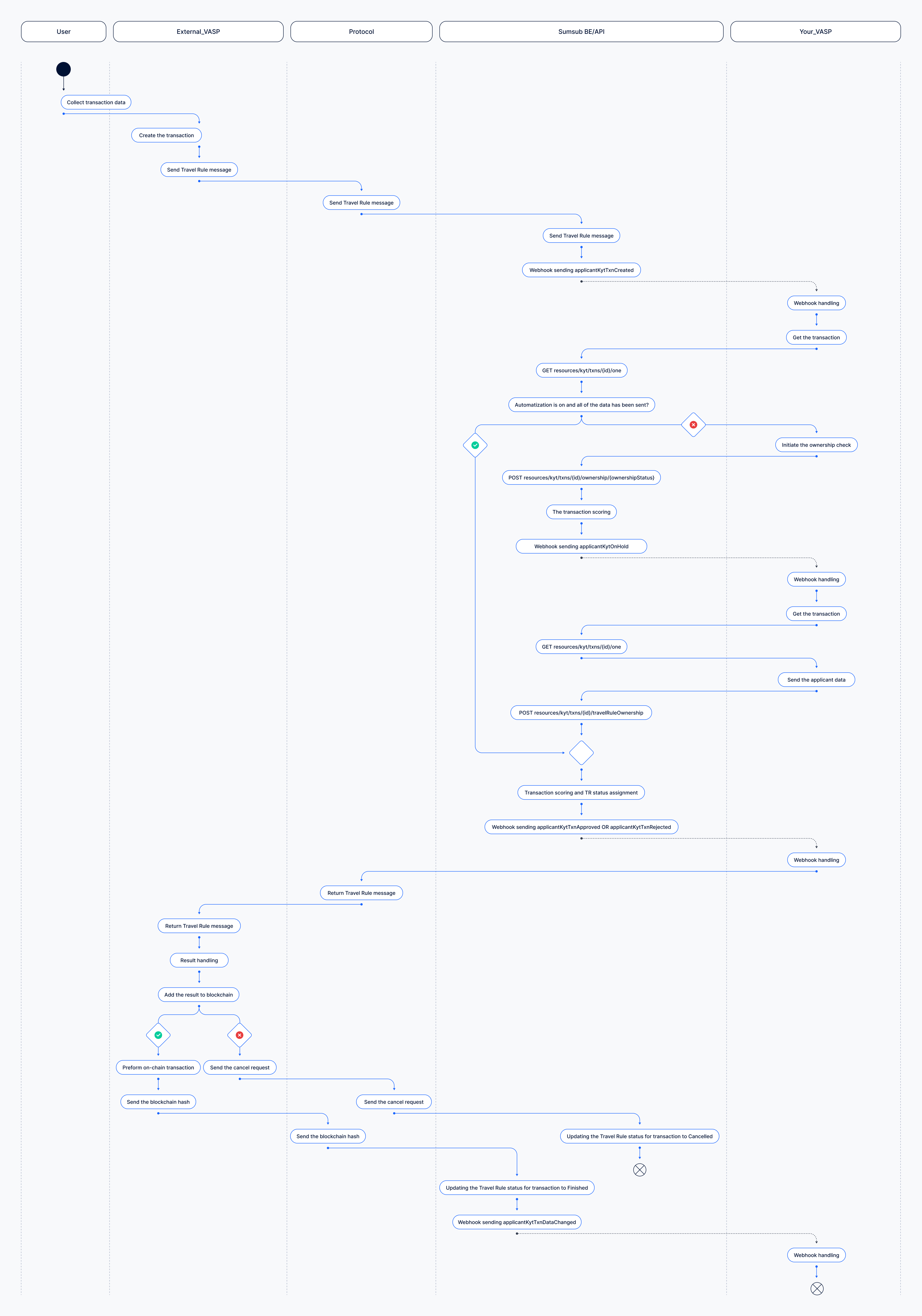
Five participants take part, matching the lanes in the diagram below: User, External_VASP, Protocol, Sumsub BE/API, Your_VASP.
- The counterparty collects their user's transfer details, creates the transaction, and the Travel Rule message travels through the protocol to Sumsub.
- Sumsub records it on your account and sends applicantKytTxnCreated webhook.
- You fetch the transaction and check what data you need to collect.
- If automation is on and everything needed is already known, Sumsub answers on your behalf and the flow skips straight to scoring. If not, you make the two responses yourself: confirm the address, then supply the participant data.
- Sumsub scores the transaction, assigns the Travel Rule status, and sends applicantKytTxnApproved or applicantKytTxnRejected.
- Your answer returns through the protocol to the counterparty. They either broadcast — and the blockchain hash comes back to you, moving the exchange to finished with an applicantKytTxnDataChanged webhook — or they cancel, and the exchange ends at
cancelled.
In this flow, you need to confirm the address and identify the user. The transaction tells you which of these two actions it still needs. Read both flags before you do anything:
| Flag | true | false |
|---|---|---|
needMasking | Confirm the address. | Already answered — skip it. |
travelRuleInfo.needApplicantOwnershipConfirmation | Identify the user. | Already answered — skip it. |
Both false means the request was answered automatically.
Identifying the user on its own returns 200, but the exchange will never be completed:
- While
needMaskingis true, the transaction is pinned atonHoldno matter what data you send. - The counterparty never receives an answer, and the request expires.
- Confirming the address is also what unmasks the counterparty's data, so until you confirm the address there is nothing to reconcile against.
Both calls return the updated transaction, so you can identify the user as soon as the response confirming the address comes back.
NoteConfirming only the address is the most common integration mistake: the exchange stops at
onHoldand eventually expires, with the same consequences as never answering at all. If you see transactions of yours sitting atonHold, that is what is happening.
Answer incoming data request
The following is a sequence of steps to be taken to answer incoming data request.
Step 1: Read request
On applicantKytTxnCreated, fetch the transaction using this API method.
Request example:
curl -X GET \
     'https://api.sumsub.com/resources/kyt/txns/69f0721264ade593a3b99000/one' \
     -H 'X-App-Token: <your-app-token>' \
     -H 'X-App-Access-Sig: <your-signature>' \
-H 'X-App-Access-Ts: <unix-timestamp>'| Field | Meaning |
|---|---|
needMasking | true — the counterparty's personal data stays hidden until you confirm the address. Confirm before you try to read it. |
travelRuleInfo.needApplicantOwnershipConfirmation | true — you must still identify which of your users owns the address. |
travelRuleInfo.status | Where the exchange stands. For more information on statuses, lifecycle, and outcomes, see this article. |
Step 2: Confirm address
Skip this step if needMasking is false.
Check data.applicant.paymentMethod.accountId against the addresses your organisation controls, then answer using this API method:
curl -X POST \
     'https://api.sumsub.com/resources/kyt/txns/66cd891eefa135789ce5264f/ownership/confirmed' \
     -H 'X-App-Token: <your-app-token>' \
     -H 'X-App-Access-Sig: <your-signature>' \
     -H 'X-App-Access-Ts: <unix-timestamp>'
curl -X POST \
'https://api.sumsub.com/resources/kyt/txns/66cd891eefa135789ce5264f/ownership/unconfirmed' \
-H 'X-App-Token: <your-app-token>' \
-H 'X-App-Access-Sig: <your-signature>' \
-H 'X-App-Access-Ts: <unix-timestamp>'Confirming unmasks the counterparty's data, adds the address to your Wallet Address Book for next time, and moves the exchange forward.
Rejecting closes it with unconfirmedOwnership, and the counterparty will normally not proceed. Reject only when the address genuinely is not yours.
Step 3: Identify the user
Skip this step if travelRuleInfo.needApplicantOwnershipConfirmation is false.
To confirm wallet ownership, use this API method:
curl -X POST \
     'https://api.sumsub.com/resources/kyt/txns/test_txn_id/travelRuleOwnership' \
     -H 'content-type: application/json' \
     -H 'X-App-Token: <your-app-token>' \
     -H 'X-App-Access-Sig: <your-signature>' \
     -H 'X-App-Access-Ts: <unix-timestamp>' \
     -d '{
            "applicantId": "67a0ec0b9aa095000000000f"
         }'
curl -X POST \
'https://api.sumsub.com/resources/kyt/txns/test_txn_id/travelRuleOwnership' \
-H 'content-type: application/json' \
-H 'X-App-Token: <your-app-token>' \
-H 'X-App-Access-Sig: <your-signature>' \
-H 'X-App-Access-Ts: <unix-timestamp>' \
-d '{
"applicantParticipant": {
"fullName": "John Doe",
"fullNameEn": "John Doe",
"externalUserId": "external_user_id",
"type": "individual"
}
}'| Case | What you send |
|---|---|
| The user already exists as an applicant. | The applicantId. |
| The user is not a Sumsub applicant. | The participant data inline. |
The data you attach here stays on your side. Sumsub compares your user’s name with the name provided by the counterparty. Only the comparison result — the exchange status — is shared. The values you attached are never sent to the counterparty.
Your Travel Rule matching settings determine how closely the two names must match.
Transfer status scenarios
For different cases, the steps above remain the same in both scenarios. The required code does not change, only the transfer status and the wallet address referenced in the request differ.
| Transfer not yet settled | Transfer already settled | |
|---|---|---|
| How to identify | info.paymentTxnId is empty. | info.paymentTxnId is populated. |
| Transfer status | The counterparty is holding the transfer until the required information is provided. | The transfer has already been completed, and the counterparty is requesting additional information. |
| Wallet address | An address used by your users to receive funds. | An address used by your users to send funds. |
ImportantIf your Wallet Address Book contains only deposit addresses, requests related to addresses used to send funds cannot be matched automatically and require manual processing.
To support automatic matching for both scenarios, upload withdrawal addresses as well.
The already-settled scenario is less commonly encountered during integration testing and has a significantly lower response rate. Make sure your integration handles requests where info.paymentTxnId is populated. Otherwise, these requests may remain unprocessed.
Response time requirements
Responses should be sent within a few seconds of receiving the webhook. Longer processing times may cause the request to expire before the response reaches the counterparty.
The available response time depends on two factors.
Counterparty confirmation timeout
Each counterparty configures its own confirmation timeout in the Travel Rule settings. The minimum available timeout is 10 seconds.
The configured timeout is not included in the transaction data and may differ between counterparties. Therefore, integrations should be designed for the minimum timeout.
The timeout covers the entire request-response cycle, including:
- Webhook delivery.
- Request processing.
- Response generation and delivery.
NoteManual ownership confirmation in the Dashboard is intended for integration and testing. In production, your webhook handler should respond within the 10-second minimum, without requiring manual action.
Sumsub can automate ownership confirmation fully or partially based on the ownership data you provide — such as Wallet Address Book entries and applicant payment methods — and the selected Confirmation ownership mode. The request is still sent to your webhook in all cases. What changes is whether your handler needs to confirm the address, identify the user, do both, or do neither.
Protocols without response window
Some Travel Rule protocols, including CODE and GTR, require an immediate response to incoming requests. There is no time for manual action. Sumsub confirms wallet ownership using your Wallet Address Book, identifies the applicant linked to the address, applies your rules, and returns the decision in the same request. By the time your webhook arrives, the response has already been sent.
For these protocols, your ownership data and rules are essential to the response. Make sure the following are in place:
-
The wallet address must be in your Wallet Address Book and registered to your VASP. Otherwise, Sumsub cannot confirm ownership, no exchange is created, and the request does not reach you.
-
The address must be linked to an applicant through a payment method. Otherwise, there is no participant data to compare with the data provided by the counterparty, and the exchange ends with
counterpartyMismatchedData. -
Your rules must return a final decision. A rule that sends the transaction for manual review is treated as a decline for these protocols. The counterparty receives a refusal in the same response, and
onHoldis not returned. Review your Travel Rule rules for any conditions that place a transaction on hold and decide what outcome they should produce instead.
Keep your Wallet Address Book and applicant payment methods up to date. This includes both deposit and withdrawal addresses, as well as any new addresses you generate.
Expired requests
If the response window expires, Sumsub marks the exchange as expired for both parties and re-evaluates it according to each party's configured rules.
The counterparty determines how expired or unanswered requests are handled. For example, their configuration may reject transfers when no response is received.
As a result, unanswered requests may delay or prevent a user's transfer from being completed. They may also affect your VASP's response rate visible to other Travel Rule participants.
Automating request handling
Automation does not change the response flow. Instead, it allows Sumsub to resolve ownership checks automatically before the request reaches your integration.
When a request can be resolved automatically, the corresponding confirmation flags are set to false, and no response is required from your side. The more complete your ownership data is, the greater the number of requests that can be processed automatically.
Automatic resolution depends on the configured Confirmation ownership mode. This setting is configured in the Dashboard.
Automating address ownership confirmation
Requires the Simplified validation or Automated validation confirmation ownership mode.
Add all wallet addresses controlled by your organisation, including both deposit and withdrawal addresses, to the Wallet Address Book.
If an incoming request references an address that has already been registered, Sumsub can confirm that the address belongs to your VASP automatically. In this case, needMasking is set to false.
Addresses are considered confirmed when they were either:
- Added to the Wallet Address Book through the API or Dashboard.
- Manually confirmed during a previous exchange.
Addresses identified only through attribution or transaction data are not treated as confirmed. This prevents addresses from being automatically confirmed without an explicit ownership declaration.
Automating applicant ownership confirmation
Requires the Automated validation confirmation ownership mode.
To associate a wallet address with a specific applicant, register the address as a payment method using this API method. Request example:
curl -X POST
     'https://api.sumsub.com/resources/applicants/6756c06e40c2f83feed050ef/payments' \
     -H 'content-type: application/json' \
     -H 'X-App-Token: <your-app-token>' \
     -H 'X-App-Access-Sig: <your-signature>' \
     -H 'X-App-Access-Ts: <unix-timestamp>' \
     -d '{
            "externalId": "id_from_your_system",
            "data": {
              "type": "cryptoWallet",
              "cryptoChain": "XRP",
              "currencyCode": "USDT",
              "accountIdentifier": "rHb9CJAWyB4rj91VRWn96DkukG4bwdtyTh",
              "memo": "12345678"
            },
            "institutionInfo": {
              "issuer": {
                "type": "license"
              }
            }
          }'
This stores the relationship between the applicant and the wallet address. When a request references the registered address, Sumsub can automatically identify the corresponding applicant and set needApplicantOwnershipConfirmation to false.
Exchange statuses
The exchange status indicates whether the request was completed successfully, requires further action, or could not be completed.
| Status | Description | Counterparty action |
|---|---|---|
awaitingOnChainTransfer | Both ownership confirmations were accepted. | The transfer can proceed and may then be broadcast. |
finished | The transfer was broadcast and the transaction hash was received. | No further action is required. |
onHold | The wallet address was confirmed, but the applicant could not be identified. | The counterparty waits for additional information. This status does not indicate a completed exchange. |
unconfirmedOwnership | You confirmed that the wallet address does not belong to your VASP. | The counterparty treats the transfer as unattributed. |
counterpartyMismatchedData | The information provided by both parties could not be reconciled. | The counterparty may review the transfer manually or decline it. |
expired | The required response was not received before the confirmation timeout expired. | The counterparty applies its configured no-response rules. |
cancelled | The counterparty cancelled the transfer after receiving your response. | No further action is required. |
Updated 28 days ago