
Start exchange before settlement
Learn how to submit compliant and secure before on-chain outgoing transfer.
Use this flow when your user is sending virtual assets to another entity, and all of the following is true:
- Your user initiated the withdrawal.
- You are the originating party.
- The blockchain transaction has not been submitted yet.
- Travel Rule data must be exchanged before the transfer goes on-chain.
This is the only flow where the exchange happens while the funds are still under your control, so make it your default for withdrawals.
Key flow parameters include the following:
- You create the exchange.
info.directionisout.info.paymentTxnIdis empty. Setting a transaction hash here instead makes it an after-settlement exchange.- The withdrawal does not proceed until the exchange completes.
TipIf the blockchain transaction has already been received on-chain, use Start exchange after settlement.
If another VASP has already initiated a request for your user's wallet, use Answer incoming request.
Before you start, complete the common setup.
How exchange before settlement works
Five participants take part, matching the lanes in the diagram below: your user, your VASP, the Sumsub backend, the protocol that carries the message, and the counterparty VASP.
- Your user supplies the transfer details, and you create the transaction on your side and submit it to Sumsub.
- Sumsub registers it and sends applicantKytTxnCreated webhook.
- Sumsub attributes the destination address to a VASP, unless you already told it which VASP to use.
- The Travel Rule message is built and delivered over a protocol both VASPs support. The counterparty system receives it and processes it.
- Sumsub assigns the Travel Rule status from the outcome and your rules decide the review result — applicantKytTxnApproved or applicantKytTxnRejected.
- You either broadcast the transfer on-chain, or cancel. A cancellation travels back through the protocol to the counterparty, and the exchange ends at cancelled.
- After broadcasting, you send the blockchain hash. It travels through the protocol to the counterparty, who is receiving the deposit, and the exchange moves to finished. Sumsub sends applicantKytTxnDataChanged.
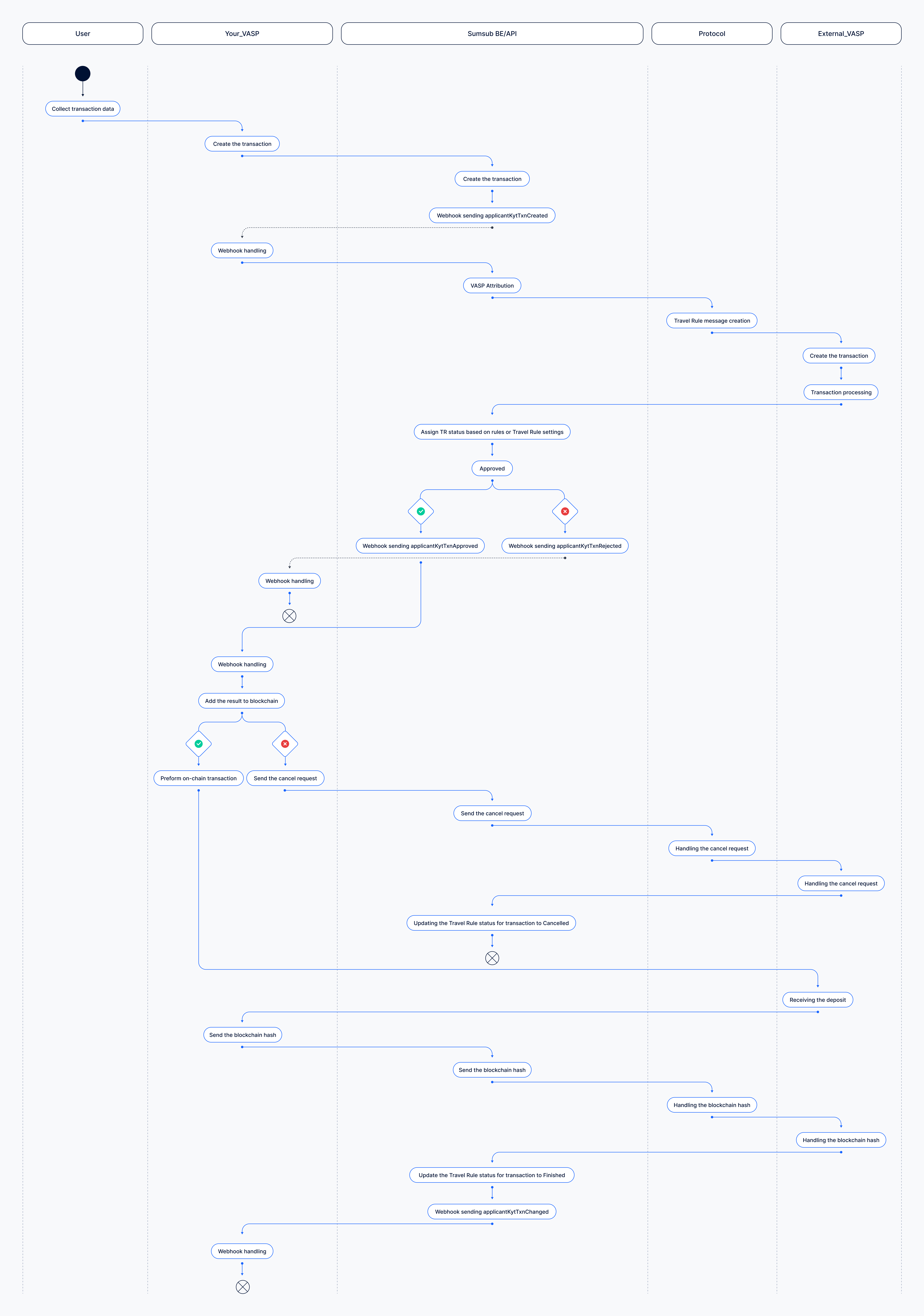
Start data exchange before settlement
The following is a sequence of steps to be taken to start data exchange before settlement.
Build options for Steps 1 and 2
The Step 1 and Step 2 — choosing the counterparty VASP and submitting the transfer — are the part of the integration you can either build yourself or hand to Sumsub.
| Step | Manual setup | Travel Rule SDK |
|---|---|---|
| Counterparty VASP | Pick the VASP yourself, or leave it to attribution. | The SDK asks the user, with the directory built in. |
| Missing participant data | You collect and send it. | The SDK asks for exactly the fields the counterparty protocol needs. |
| Unhosted wallet ownership | You trigger it separately. | Handled in the same session. |
| Creating the transaction | You call the API. | Created for you when the user finishes. |
TipIf you embed the Travel Rule SDK, the system does the Step 1 and Step 2 for you — you generate a token for the transfer, show the SDK, and the transaction is created once the user completes it. Everything from Step 3 onwards goes the same way. The SDK requires the user to exist as a Sumsub applicant.
Step 1: Identify counterparty VASP
This is the step that decides whether the rest of the flow works at all, and it is the one most integrations skip. You have two options.
Pick VASP
This option is recommended.
Add a destination selector to your withdrawal screen: the user picks the exchange or wallet provider they are sending to, and you pass its id as counterparty.institutionInfo.internalId. Attribution is then skipped entirely and the request goes straight to the counterparty.
Build the picker on Get available VASPs. Search it on the q parameter as the user types — people know brand names, not legal entities — and send whatever they recognise.
They can pick a group rather than one of its regional entities: Sumsub resolves the group down to the entities underneath it that can actually receive the request.
AttentionThis is the single biggest lever you have on Travel Rule success rate. Attribution from a bare wallet address is the hardest problem in the whole process and it fails often. The difference between supplying the VASP and leaving it to attribution is large enough that it should shape your withdrawal UI.
Submit without VASP
Send only the destination wallet address and let Sumsub attribute it:
- Sumsub checks the wallet address databases first — Sumsub own internal wallet database, then the Wallet Address Book, where VASPs across the network register the addresses they control.
- Then Sumsub asks the Travel Rule protocols whether they recognise the address, and falls back to blockchain analytics providers.
This is the right fallback when the user does not know or cannot find their destination, but a significant share of addresses cannot be attributed at all.
NoteYou can offer both. Show the picker, and let the user proceed without it if they cannot find their destination — an unattributed transfer is better than an abandoned one.
Step 2: Submit transfer
Send the transfer to Sumsub before you broadcast anything.
- For a user who already exists as an applicant, use the Submit transaction for existing applicant method.
- For a user who is not a Sumsub applicant, use the Submit transaction without applicant method.
- For batches, use the Submit transactions in bulk method.
The fields that define this flow:
| Field | Value |
|---|---|
type | travelRule |
info.direction | out |
info.paymentTxnId | Omit. |
applicant | Your user — the sender. |
counterparty.paymentMethod.accountId | The destination wallet address. |
counterparty.institutionInfo.internalId | The VASP ID from Step 1, whenever you have it. |
info | amount, currencyCode, currencyType: "crypto", chain parameters |
NoteField requirements differ by protocol and by participant type. For more information, see the protocol requirements.
Step 3: Attribution and protocol selection
If you supplied counterparty.institutionInfo.internalId, attribution is skipped and Sumsub goes straight to selecting a protocol.
If you did not, Sumsub attributes the destination address first.
One of the following scenarios then happens:
- Counterparty identified and reachable. The request is delivered and the status becomes
awaitingCounterparty. - Counterparty identified, no shared protocol →
counterpartyVaspNotReachable. Sumsub still emails the VASP about this specific transfer. The attempt is recorded in the Dashboard under Events → Emails with recipient and timestamp and can be exported to CSV — which is what you show a regulator to evidence that you tried every available channel to reach the counterparty. For more information on email notifications, see this article. - Counterparty identified, but what you sent is incomplete →
notEnoughCounterpartyData. This is Sumsub validating your payload against the counterparty protocol, not a decline by them. - No VASP attributed →
counterpartyVaspNotFound. The destination is treated as an unhosted wallet. - Deliberately skipped →
notApplicable. Your configuration excluded this transfer, for example because it is below your minimum amount threshold.
Your confirmation timeout determines how long you wait. Only the awaitingCounterparty and onHold statuses can expire.
NoteIf no VASP is attributed, the destination is treated as an unhosted wallet and your unhosted wallet configuration takes over — asking the user to prove ownership of the address before the withdrawal proceeds. For more information, refer to this article.
Step 4: Confirm before broadcasting
Submit the withdrawal on-chain only when both of these are true:
- The Travel Rule data exchange has completed for the transaction, or Travel Rule was intentionally marked
notApplicableby your configuration. - The transaction has passed your rules and compliance review.
Sumsub tells you where the transaction is with one of the following webhooks.
| Webhook | Meaning | Action |
|---|---|---|
| applicantKytTxnApproved | Cleared by your rules. | Broadcast. |
| applicantKytTxnAwaitingUser | The counterparty VASP has received the Travel Rule request and has not answered yet. The Travel Rule status is awaitingCounterparty. | Wait. Another webhook follows when the counterparty answers or your confirmation timeout expires. |
| applicantKytOnHold | The transaction cannot proceed yet. Either your user has not proved ownership of an unhosted wallet, or your compliance team must review the transaction. | Hold. |
| applicantKytTxnRejected | Blocked by your rules. | Do not broadcast. |
ImportantThe meanings in the table apply to the default Travel Rule bundle. The webhook type follows the transaction review status (
awaitingUser,onHold), and your rules set that status. A custom rule can therefore use the same webhooks for other cases.For example, a rule that sends the applicant to a verification level puts the transaction in
awaitingUseruntil your user completes that level.
Note that the Travel Rule status and the review outcome are two different things.
- The Travel Rule status tells you what happened in the data exchange.
- The review outcome tells you whether your organisation should proceed, block, or manually review the withdrawal.
A transaction can be approved while its exchange sits at expired — the bundle you installed decides what each outcome means. For more information on statuses, lifecycle, and outcomes, see this article.
NoteAfter submission you can also track Travel Rule transaction statuses in the Dashboard, under Transactions and travel rule.
Step 5: Link blockchain transaction
Once you broadcast, send the on-chain hash back using this API method, putting the hash in paymentTxnId.
Request example:
curl -X PATCH \
     'https://api.sumsub.com/resources/kyt/txns/66cd891eefa135789ce5264f/data/info' \
     -H 'content-type: application/json' \
     -H 'X-App-Token: <your-app-token>' \
     -H 'X-App-Access-Sig: <your-signature>' \
     -H 'X-App-Access-Ts: <unix-timestamp>' \
     -d '{
           "paymentTxnId": "3213654zdrgsetrr51435ergh453t5z43rb"
         }'
The status moves from awaitingOnChainTransfer to finished, and Sumsub sends applicantKytTxnDataChanged webhook.
Nothing links the blockchain transaction for you. This is the step integrations most often omit, and it is the only route to finished — no exchange reaches that status on its own
The hash is also forwarded to the counterparty, so until you send it they cannot reconcile the data they hold against anything on-chain, and neither side has a complete record for audit.
Step 6: Cancel data exchange
If the user abandons the withdrawal after the exchange completed, close it using this API method.
Request example:
curl -X POST \
     'https://api.sumsub.com/resources/api/tr/66cd891eefa135789ce5265g/cancel' \
     -H 'Content-Type: application/json' \
     -H 'X-App-Token: <your-app-token>' \
     -H 'X-App-Access-Sig: <your-signature>' \
     -H 'X-App-Access-Ts: <unix-timestamp>' \
The cancellation is delivered to the counterparty through the same protocol, and the exchange ends at cancelled. Leaving it open instead occupies the counterparty queue until it expires and records you as unresponsive to them.
Protocol requirements
Which fields are mandatory depends on the protocol the counterparty VASP speaks. If they are missing, the exchange ends at notEnoughCounterpartyData before anything is sent.
| Protocol | Individual | Company |
|---|---|---|
| Sumsub | Nothing extra for your own user. For the counterparty, the fields you require are the ones you configured in your Travel Rule matching settings. | — |
| CODE | type, wallet address, and a name — either fullName or firstNameEn + lastNameEn + nameType. dob is required for your own user only. | type, wallet address, fullName, address.country, and the CEO firstNameEn + lastNameEn + nameType |
| GTR | type and a name, same rule as CODE. Wallet address is required for the counterparty only. | type and fullName Wallet address is required for the counterparty only. |
Updated 19 days ago