
Short video fragment
Verify applicant identities with facial biometric and voice checks.
Short Video Fragment is a check that allows you to verify the applicant's identity via a short and comfortable procedure.
The technology used to analyze the recorded video fragments involves facial biometric and voice checks.
With this technology, you will be able to protect yourself against spoofing and presentation attacks, while keeping the number of drop-offs as low as possible.
How video fragment check works
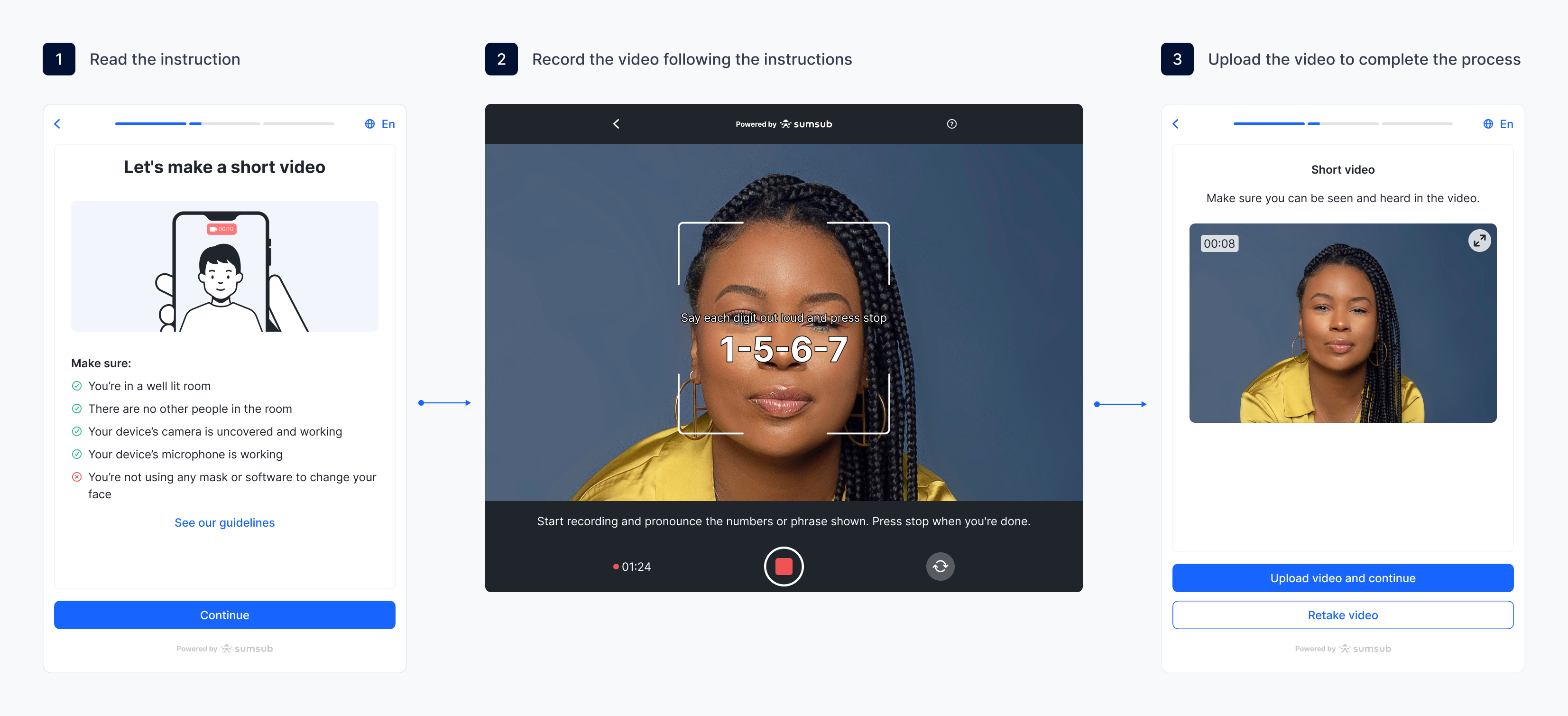
During the short video fragment check, applicants undergo the following steps:
- The applicant positions their face in the frame.
- The applicant presses record and reads aloud the four digits shown on screen.
- The system processes the data and returns a result.
If the applicant reopens the Web or Mobile SDK partway through an unfinished short video fragment attempt — for example, by refreshing the page or continuing on another device — their incomplete steps are cleared and they start the check over. Any rejection reasons shown before the restart may no longer be visible.
Get started with video fragment check
Perform Short Video Fragment verification via Sumsub’s SDK that takes care of every stage included in the process:
- Configure the WebSDK and/or MobileSDK integration.
- Create a verification level and add a Selfie step with the Short video fragment type.
- Review verification results.
Review video fragment verification results
To review the verification results:
- Go to Monitoring → Applicants and select an applicant who passed the short video fragment check.
- In the profile, navigate to the Selfie section and review the results.
Updated 5 days ago