
Non-Doc Identity Verification
The most effective solution to global customer identification.
Sumsub's Non-Doc Identity Verification solution enables businesses to onboard their customers without the need to capture physical identity document images, by leveraging verified records from national digital identity systems and authoritative data sources.
Our product flow is designed to deliver seamless end user identification in two simple stages:
- Verifying unique personal data attributes
- Authenticating the data ownership
These steps allow the system to automatically retrieve a comprehensive identity profile from the source, validate the user's real-time presence, and ensure that the record belongs to the right individual.
Moreover, the solution helps regulated organizations meet their AML/CDD compliance requirements, while simultaneously boosting conversion rates up to 97%, reducing processing times to ~4.5 seconds, and effortlessly reaching over 3 billion users globally.
Overall, the Non-Doc Identity Verification offers a reliable and compliant alternative to traditional, documentary customer onboarding methods, all through an effortless end user experience.
Use case
Fast customer identification that ensures a seamless experience through a well-recognized user flow, while adhering to both national and international regulatory requirements.
How Non-Doc Identity Verification works
The verification process is typically completed in under 5 seconds, requiring minimal user action; it is simple and streamlined to enhance the customer journey that ensures a high level of identity proofing.
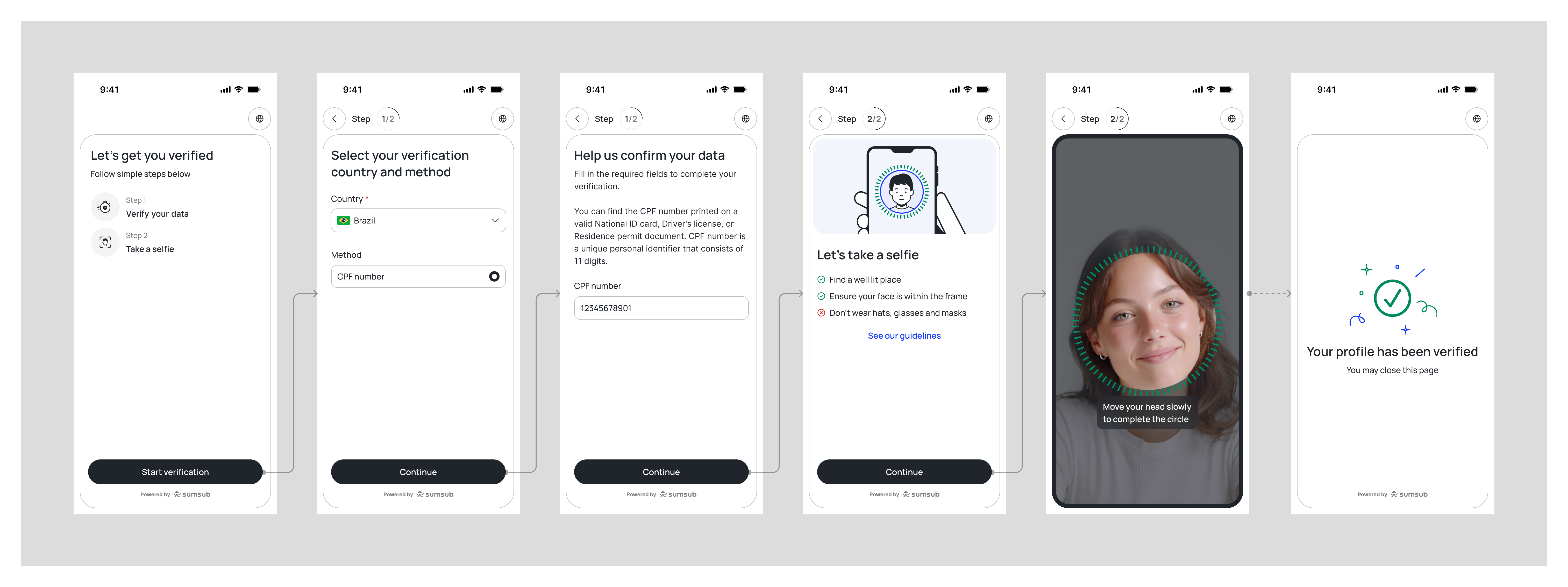
Non-Doc Identity Verification flow
Step-by-step user verification journey:
- Applicant enters their unique personal identifier(s) on the application interface.
- Applicant authenticates themselves either via the Active Liveness or Multi-factor authentication check.
- System instantly retrieves all personal data and ensures its rightful ownership.
- Sumsub additionally cross-checks relevant user information to ensure a complete identity match.
- The onboarding is successfully completed.
Solution benefits
The Non-Doc Identity Verification delivers the following advantages to your business:
- Coverage. Reach verified records of over 3 billion customers globally with the use of a single solution.
- Compliance. Ensure full compliance with the applicable AML/CDD guidelines for electronic customer identification.
- Improved Conversion Rates. Increase your customer conversion and success rates with an effortless, document-free verification experience.
- Fraud Prevention. Enhance the onboarding security with advanced data verification and customer authentication technology.
- Seamless Integration. Easily integrate the solution into your systems through Sumsub's flexible API and SDK frameworks.
Solution availability
The following is a list of Sumsub's Database Products that enable the Non-Doc Identity Verification solution globally:
|
Product name |
Input data |
Output data |
Source type |
Coverage |
Data input method |
|---|---|---|---|---|---|
| Argentina DNI Verification (arg_gov_dni) |
|
|
Government
|
97%
|
|
The Non-Document Identity Verification process in Argentina consists of the following steps:
- Applicant provides their DNI number and specifies gender.
- Sumsub validates the provided data through the government database.
- Applicant is offered to pass Liveness if the data is valid.
- Applicant passes Liveness.
- The government database compares the Liveness results with the applicant’s photos from the corresponding database.
- Applicant is approved if there is the same person on both Liveness and the photo from the database, and rejected if not.
|
Product name |
Input data |
Output data |
Source type |
Coverage |
Data input method |
|---|---|---|---|---|---|
| Australia Identity Verification (aus_agg_2x2) |
Driver's license
Passport
|
|
Aggregated
|
75%
|
|
The Non-Document Identity Verification process in Australia consists of the following steps:
-
Applicant provides their name, date of birth, address details, and identity document details (Driver's License, Passport, or Visa) on the application interface.
-
Sumsub instantly checks all provided data elements against two sources: DVS (Document Verification Service) and Credit Bureau.
-
Applicant is approved if a data match is found for:
Name and Date of Birth data against both sources, or
Name and Date of Birth data in DVS together with Name and Address data in Credit Bureau.
-
Data match results for the Address fields are additionally indicated, regardless of the approval outcome. If a particular piece of applicant information is not found against one or both sources, this is indicated accordingly.
-
Applicant onboarding is successfully completed.
|
Product name |
Input data |
Output data |
Source type |
Coverage |
Data input method |
|---|---|---|---|---|---|
| Belgium itsme Verification (bene_gov_itsme_idv) |
|
|
Aggregated
|
85%
|
|
The Non-Document Identity Verification process in Belgium consists of the following steps:
- Applicant selects itsme® as the verification method (or it is pre-selected by the client's configuration) and confirms the Sumsub SDK consent screen.
- Applicant is redirected to itsme® via the provider's gateway and authenticates via the app — directly on the same device, or on their phone after entering a mobile number or scanning a QR code.
- Applicant reviews the requested data and confirms with their itsme® code, fingerprint, or Face ID.
- itsme® returns the verified identity dataset along with the eID evidence of the transaction.
- Sumsub cross-checks the data and updates the Applicant record.
- Applicant is returned to the Sumsub SDK with the verification result and continues onboarding.
|
Input data |
Output data |
Source type |
Coverage |
|---|---|---|---|
|
|
Government
|
95%
|
The Non-Document Identity Verification process in Bangladesh consists of the following steps:
- Applicant provides their NID number and date of birth.
- Sumsub validates the provided data through the government database.
- Applicant is offered to pass Liveness if the data is valid.
- Applicant passes Liveness.
- Sumsub compares the Liveness results with the applicant’s photos from the corresponding database.
- Applicant is approved if there is the same person on both Liveness and the photo from the database, and rejected if not.
In Bangladesh, non-documentary identity verification is currently endorsed under the 2019 Guidelines on Electronic Know Your Customer (e-KYC) (“Guidelines”), issued by the Bangladesh Financial Intelligence Unit (BFIU) and applicable to all reporting entities. However, it implies several restrictions:
- the Guidelines only apply to KYC conducted in respect of natural persons holding a valid national ID card (NID) of Bangladesh with biometric data stored therein;
- fully remote KYC (where the customer does not visit the premises of the reporting entity) prescribes a seamless procedure with the following steps: (i) the NID is captured from both sides, with the data extracted by OCR; (ii) the customer’s face is captured with a high-resolution camera; (iii) the necessary identity data (name, parental names, address, phone number, etc.) is collected in digital format; (iv) the client’s wet signature or electronic signature or digital signature or PIN is collected for future reference; (v) the data is authenticated against the official database held by the NID Wing of Election Commission; and (vi) AML screening is carried out (see Section 3.3 of the Guidelines).
As for individuals that do not hold a NID, the document-based approach is predominant. For example, the Guidance Notes on Prevention of Money Laundering and Terrorist Financing for Financial Institutions by the BFIU and the Central Bank of Bangladesh suggest a photo-bearing ID (which, furthermore, has to be certified and, as per Section 7.3.5.1, supplemented with at least one additional check to “guard against impersonation”) is a necessary element in the KYC procedure:
“The original, certified copy of the following Photo ID also plays vital role to identify the customer: (i) Current valid passport; (ii) Valid driving license; (iii) National ID Card; (iv) Employer provided ID Card, bearing the photograph and signature of the applicant; Identification documents which do not bear photographs or signatures, or are easy to obtain, are normally not appropriate as sole evidence of identity [...]” (Section 7.3.5).
Likewise, in terms of confirming the customer’s address, one or more of the following steps is recommended:
- “provision of a recent utility bill, tax assessment or bank statement containing details of the address (to guard against forged copies it is strongly recommended that original documents are examined);
- checking the Voter lists;
- checking the telephone directory [the only reference to non-documentary evidence];
- visiting home/office;
- sending thanks letter” (Section 7.3.5).
Accordingly, the only explicitly permitted electronic-based KYC solution is limited to NID holders and requires the customer to actually present the NID at the onboarding stage for capturing.
|
Product name |
Input data |
Output data |
Source type |
Coverage |
Data input method |
|---|---|---|---|---|---|
|
Brazil CPF Verification (bra_crd_cpf_prem) |
|
|
Credit Bureau
|
85%
|
|
|
Brazil CPF Verification (bra_crd_id) |
|
|
Credit Bureau
|
80%
|
|
| Brazil CPF Verification (bra_gov_cpf) |
|
|
Government
|
65%
|
|
The Non-Document Identity Verification process in Brazil consists of the following steps:
- Applicant provides their CPF number.
- Sumsub validates the provided number through the government database.
- Applicant is offered to pass Liveness if the CPF number is valid.
- Applicant passes Liveness.
- The government database compares the Liveness results with the applicant’s photos from the corresponding database.
- Applicant is approved if there is the same person on both Liveness and the photo from the database, and rejected if not.
|
Product name |
Input data |
Output data |
Source type |
Coverage |
Data input method |
|---|---|---|---|---|---|
| Canada Identity Verification (can_crd_idv) |
|
|
Credit
|
80%
|
|
The Non-Document Identity Verification process in Canada consists of the following steps:
- Applicant provides their Name, Date of Birth, and Address.
- Sumsub links the provided information to verified credit trade line records.
- Each identity element is automatically matched against the existing profile using either the Credit File or Dual-Process method.
- Applicant is approved if all identity elements successfully match, or rejected if the requirements are not met.
|
Product name |
Input data |
Output data |
Source type |
Coverage |
Data input method |
|---|---|---|---|---|---|
| Colombia NUIP Verification (col_gov_runt_ani) |
|
|
Government
|
60%
|
|
The Non-Document Identity Verification process in Colombia consists of the following steps:
- Applicant provides their Personal Identification Number (NUIP).
- Sumsub validates the provided data through the government database.
- Applicant is offered to pass Liveness if the data is valid.
- Applicant passes Liveness.
- The government database compares the Liveness results with the applicant’s photos from the corresponding database.
- Applicant is approved if there is the same person on both Liveness and the photo from the database, and rejected if not.
|
Product name |
Input data |
Output data |
Source type |
Coverage |
Data input method |
|---|---|---|---|---|---|
| Denmark MitID Verification (dnk_bankid_mitid) |
|
|
Government
|
96%
|
|
The Non-Document Identity Verification process in Denmark consists of the following steps:
- Applicant provides their MitID User ID.
- Applicant authenticates themselves on the platform to achieve either a Substantial or High Level of Assurance.
- Applicant provides their personal identification (CPR) number.
- Applicant passes Liveness.
- The system instantly retrieves all personal data stored on the MitID platform and ensures its rightful ownership.
- Sumsub additionally cross-checks relevant applicant information to ensure a complete identity match.
|
Product name |
Input data |
Output data |
Source type |
Coverage |
Data input method |
|---|---|---|---|---|---|
| Finland FTN Verification (fin_bankid_ftn) |
|
|
Banking
|
95%
|
Manual
|
The Non-Document Identity Verification process in Finland consists of the following steps:
- Applicant selects the relevant ID provider (their bank from the FTN network).
- Applicant authenticates themselves in the selected bank’s system to achieve a Substantial Level of Assurance.
- The system instantly retrieves all available personal data stored on the FTN platform and ensures its rightful ownership.
- Optionally, applicant passes Liveness.
- Sumsub uses the retrieved data to verify the applicant’s identity.
- The applicant onboarding is complete.
|
Product name |
Input data |
Output data |
Source type |
Coverage |
Data input method |
|---|---|---|---|---|---|
| France L'Identité Numérique Verification (fra_pst_eid) |
|
|
Government
|
11%
*100% coverage of all L’Identité Numérique holders. |
|
The Non-Document Identity Verification process in France consists of the following steps:
- An applicant initiates the onboarding process by providing a phone number that is linked directly to the verified L’identité Numérique profile.
- The applicant authenticates via the La Poste application using a 4-digit PIN, confirming both their data ownership and real-time presence.
- Sumsub retrieves user data from the La Poste platform.
- The applicant onboarding is complete.
|
Product name |
Input data |
Output data |
Source type |
Coverage |
Data input method |
|---|---|---|---|---|---|
| India Aadhaar Verification (DigiLocker) (ind_gov_aadhaar_digi) |
|
|
Government
|
95%
|
|
Digilocker verification process:
- Applicant provides their Aadhaar number on the Digilocker screen.
- If the Aadhaar number is valid and the phone number is associated, the government database sends the code to the applicant.
- Applicant provides the code and Sumsub sends it to the government database for verification.
- Applicant is suggested to input and validate the 6-digit Digilocker PIN associated with their Digilocker account. If the applicant does not have a Digilocker account yet, they can register and create a fresh 6 -digit PIN on the same screen.
- Digilocker asks the applicant to give consent to use their 'Aadhaar' specific data for a certain period of time.
- Once the applicant consents, their Aadhaar details is finally verified and data is retrieved successfully.
|
Product name |
Input data |
Output data |
Source type |
Coverage |
Data input method |
|---|---|---|---|---|---|
| Indonesia NIK Verification (idn_gov_nik) |
|
|
Government
|
95%
|
|
The Non-Document Identity Verification process in Indonesia consists of the following steps:
- Applicant provides their KTP number and name.
- Sumsub validates the provided data through the government database.
- Applicant is offered to pass Liveness if the data is valid.
- Applicant passes Liveness.
- The government database compares the Liveness results with the applicant’s photos from the corresponding database.
- Applicant is approved if there is the same person on both Liveness and the photo from the database, and rejected if not.
|
Product name |
Input data |
Output data |
Source type |
Coverage |
Data input method |
|---|---|---|---|---|---|
|
Kazakhstan IIN Verification (kaz_gov_erp)
|
|
|
Government
|
15 000 residents
|
|
The Non-Document Identity Verification process in Kazakhstan consists of the following steps:
- Applicant enters their 12-digit IIN on the application interface.
- Applicant captures a selfie using Sumsub's Liveness check.
- System queries the Kazakhstan eResidency government API and retrieves the verified identity profile (including the NFC-chip photo).
- System performs a 1:1 biometric match between the selfie and the NFC-chip photo.
- System returns the full identity profile with match result; verification is complete.
|
Product name |
Input data |
Output data |
Source type |
Coverage |
Data input method |
|---|---|---|---|---|---|
| Kenya Identity Verification (ken_gov_id_docfree) |
|
|
Government
|
95%
|
|
| Kenya Identity Verification (ken_gov_passport_docfree) |
|
|
Government
|
95%
|
|
The Non-Document Identity Verification process in Kenya consists of the following steps:
- Applicant initiates the verification session via Sumsub.
- Applicant selects Kenya as their country of onboarding.
- Applicant provides their Passport or National ID number.
- Applicant passess Liveness.
- Sumsub extracts all personal data from the government database under the provided document number.
- Sumsub cross-matches the applicant selfie image with the photo image in the government database.
- Applicant is redirected back to the merchant website; onboarding is complete.
|
Product name |
Input data |
Output data |
Source type |
Coverage |
Data input method |
|---|---|---|---|---|---|
| Netherlands iDIN Verification (nld_crd_idin) |
|
|
Banking
|
80%
|
|
The Non-Document Identity Verification process in Netherlands consists of the following steps:
- Applicant enters their First and Last name associated with the verified bank account.
- Applicant chooses their bank from the drop-down list.
- Applicant logs into their bank account and agrees to share their data.
- Sumsub gets a confirmation of a successful authentication and retrieves all personal user data stored on the account.
- The applicant onboarding is complete.
|
Product name |
Input data |
Output data |
Source type |
Coverage |
Data input method |
|---|---|---|---|---|---|
| Nigeria NIN Verification Slip (nga_gov_nin_slip) |
|
|
Government
|
96%
|
|
| Nigeria NIN Verification (nga_gov_nin) |
|
|
Government
|
96%
|
|
| Nigeria NIN Verification Phone (nga_gov_nin_phone) |
|
|
Government
|
96%
|
|
| Nigeria BVN Verification (nga_gov_bvn) |
|
|
Government
|
92%
|
|
|
Nigeria Identity Verification (nga_gov_dl_docfree)
|
|
|
Government
|
80%
|
|
The Non-Document Identity Verification process in Nigeria consists of the following steps:
- Applicant provides either their BVN (Bank Verification Number), NIN (National Identification Number), Phone Number or Driver's License number.
- Sumsub validates the provided number through a government database.
- Applicant is offered to pass Liveness if the data is valid.
- Applicant passes Liveness.
- Sumsub compares the Liveness results with the applicant’s photos from the corresponding database.
- Applicant is approved if there is the same person on both Liveness and the photo from the database, and rejected if not.
|
Product name |
Input data |
Output data |
Source type |
Coverage |
Data input method |
|---|---|---|---|---|---|
| Norway BankID Verification (nor_bankid_nbid_bid) |
|
|
Banking
|
97%
|
|
The Non-Document Identity Verification process in Norway consists of the following steps:
- Applicant enters their National identification number (NIN).
- Applicant authenticates themselves on the BankID application using their login credentials.
- The system instantly retrieves all personal data stored on the BankID platform and ensures its rightful ownership.
- Sumsub additionally cross-checks relevant user information to ensure a complete identity match.
- Applicant onboarding is successfully completed.
|
Product name |
Input data |
Output data |
Source type |
Coverage |
Data input method |
|---|---|---|---|---|---|
| Singapore Singpass Verification (sgp_gov_singpass) |
|
Singapore citizens:
Singapore residents:
|
Government
|
97%
|
|
The Non-Document Identity Verification process in Singapore consists of the following steps:
- Applicant initiates the verification session via Sumsub.
- Applicant selects Singapore as their country of onboarding and chooses identity document type.
- Applicant clicks the Retrieve Myinfo with Singpass button and then logs in to the Singpass using credentials or a QR code.
- Applicant agrees to retrieve personal details from their Singpass account.
- Sumsub transfers personal data from Singpass and populate it on the screen.
- Applicant reviews their personal data and decides whether to continue verification with the retrieved data or upload documents instead.
- Sumsub verifies transferred personal data; onboarding is completed.
|
Product name |
Input data |
Output data |
Source type |
Coverage |
Data input method |
|---|---|---|---|---|---|
| South Africa SAID Verification (zaf_gov_id_docfree) |
|
|
Government
|
97%
|
|
| South Africa SAID Archive Verification (zaf_gov_id_cache) |
|
|
Government
|
89%
|
|
The Non-Document Identity Verification process in South Africa consists of the following steps:
- Applicant initiates the verification session via Sumsub.
- Applicant selects South Africa as their country of onboarding.
- Applicant inputs their National ID number.
- Applicant passess Liveness.
- Sumsub extracts all personal data from the government database under the provided document number.
- Sumsub cross-matches the applicant selfie image with the photo image in the government database.
- Applicant is redirected back to the merchant website; onboarding is complete.
|
Product name |
Input data |
Output data |
Source type |
Coverage |
Data input method |
|---|---|---|---|---|---|
| Sweden BankID Verification (swe_bankid_sbid) |
|
|
Banking
|
98%
|
Manual
|
The BankID Non-Document Identity Verification process in Sweden consists of the following steps:
- Applicant selects BankID as the verification method.
- Applicant selects the authentication medium: Mobile BankID app or BankID application for macOS/Windows.
- Applicant signs the authentication request in the selected BankID application.
- Sumsub retrieves the available personal data from BankID and confirms successful verification.
- Applicant is redirected back to the merchant website; onboarding is complete.
|
Product name |
Input data |
Output data |
Source type |
Coverage |
Data input method |
|---|---|---|---|---|---|
| UK Identity Verification (gbr_crd_bank) |
|
|
Banking
|
97%
|
|
| UK eVisa Verification (gbr_gov_evisa) |
|
|
Government
|
8%
|
|
The BankID Non-Document Identity Verification process in the United Kingdom consists of the following steps:
- Applicant chooses their bank from the drop-down list.
- Applicant logs into their bank account and agrees to share their data.
- Sumsub transfers the data attributes to the merchant and confirms successful verification.
- Applicant is redirected back to the merchant website; onboarding is complete.
The eVisa Non-Document Identity Verification process in the United Kingdom consists of the following steps:
- Applicant with a valid eVisa generates a share code to prove their immigration status.
- Applicant enters their date of birth and newly generated share code.
- Applicant performs a Liveness check to capture their biometrics and demonstrate real-time presence.
- The system instantly retrieves all personal data stored on the UKVI platform and confirms its ownership.
- Sumsub additionally cross-checks relevant user information to ensure a complete identity match.
- Applicant onboarding is successfully completed.
|
Product name |
Input data |
Output data |
Source type |
Coverage |
Data input method |
|---|---|---|---|---|---|
| USA SSN Verification (usa_agg_phone) |
|
|
Aggregated
|
92%
|
|
The Non-Document Identity Verification process in the United States of America consists of the following steps:
- An applicant initiates the onboarding process by providing a phone number, SSN and date of birth.
- The applicant carries out Mobile Authentication using Sumsub OTP check.
- Sumsub extracts pre-verified user data from the respective source.
- The applicant is approved if the data input matches the respective source and rejected if not.
- The applicant profile is enriched with data and verification result.
|
Product name |
Input data |
Output data |
Source type |
Coverage |
Data input method |
|---|---|---|---|---|---|
| Uzbekistan Identity Verification (uzb_gov_id) |
|
|
Government
|
90%
|
|
| Uzbekistan PINFL Verification (uzb_gov_pinfl) |
|
|
Government
|
90%
|
|
The Passport Non-Document Identity Verification process in the Uzbekistan consists of the following steps:
- Applicant has two options to verify themselves with a valid Passport Number.
- Applicant enters their Passport Number, First name, Last name (Surname) and Date of birth.
- Applicant performs a Liveness check to capture their biometrics and demonstrate real-time presence.
- The system instantly matches the inputted personal data against the data stored on the source and confirms its ownership.
- Sumsub additionally cross-checks relevant applicant information to ensure a complete identity match.
- Applicant onboarding is successfully completed.
The PINFL Non-Document Identity Verification process in Uzbekistan consists of the following steps:
- Applicant has two options to verify themselves with a valid Personal Identification Number (PINFL).
- Applicant enters their Personal Identification Number (PINFL), First name, Last name (Surname) and Date of birth.
- Applicant performs a Liveness check to capture their biometrics and demonstrate real-time presence.
- The system instantly matches the inputted personal data against the data stored on the source and confirms its ownership.
- Sumsub additionally cross-checks relevant applicant information to ensure a complete identity match.
- Applicant onboarding is successfully completed.
NoteThe data input method indicates how the applicant data required for verification can be submitted:
- Manual — manual filling by the user via the UI
- OCR — automatic filling by extracting the information from supported identity document(s)
- API — automatic filling by submitting the information via API
Get started with Non-Doc Identity Verification
Explore alternative identity verification options
Updated 4 days ago