
Sumsub ID Connect
Streamline privacy-preserving identity verification using Sumsub ID Connect.
Sumsub ID Connect lets a business request specific verified identity claims — such as age, name, nationality, country of residence, or humanness signals — from a user’s Sumsub ID account. The business integrates an OIDC-based connection, while Sumsub hosts the user-facing sign-in, account creation, verification, and authorization flow.
The user signs in to or creates their Sumsub ID account, completes any verification needed to satisfy the requested claims, and authorizes the business to receive them. The business does not need to run its own identity verification for these specific data points.
Typical use cases include age verification, humanness checks for AI and agentic platforms, verifying directors and beneficial owners in KYB flows, and gating premium experiences behind verified identity.
How Sumsub ID Connect works
Sumsub ID Connect uses a JavaScript library that follows OIDC (Open ID Connect) standards. With this library, you can add a Verify with Sumsub ID button to any platform, which triggers a Sumsub ID hosted user flow.
During setup, you define OIDC scopes that specify which verified claims (for example, age, name, nationality) your service needs. You can adjust these scopes and other options in the Sumsub dashboard.
When a user clicks Verify with Sumsub ID, your application redirects them to the Sumsub ID Connect flow. The flow checks whether the user already has a Sumsub ID account and whether that account contains enough verified data to satisfy the requested scopes. If necessary, the user completes any missing verification steps. Sumsub hosts and maintains all verification screens, so you do not need to implement or operate these flows yourself.
After the user finishes the flow, the integrating business will receive verified claims as per OIDC protocol standards. This response includes a cryptographically signed JWT (JSON Web Token) that contains the user’s identity claims and can be validated to confirm the token's authenticity and integrity.
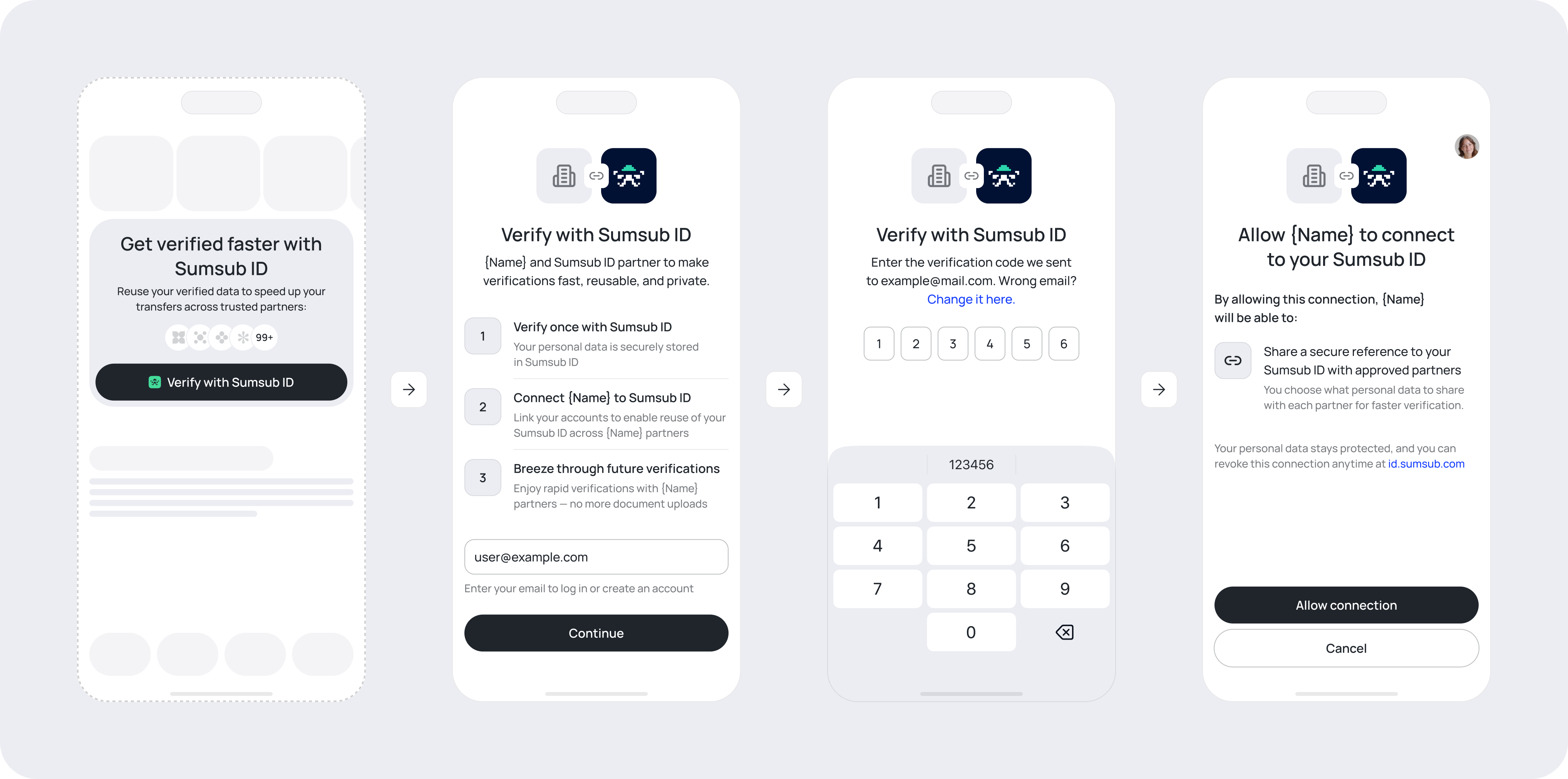
Existing Sumsub ID account
If Sumsub ID already exists and contains requested verified data:
- Authentication. User provides and confirms their email address.
- Authorisation. User gives permission to reveal certain verified claims to the integrating business.
Non-existing Sumsub ID account
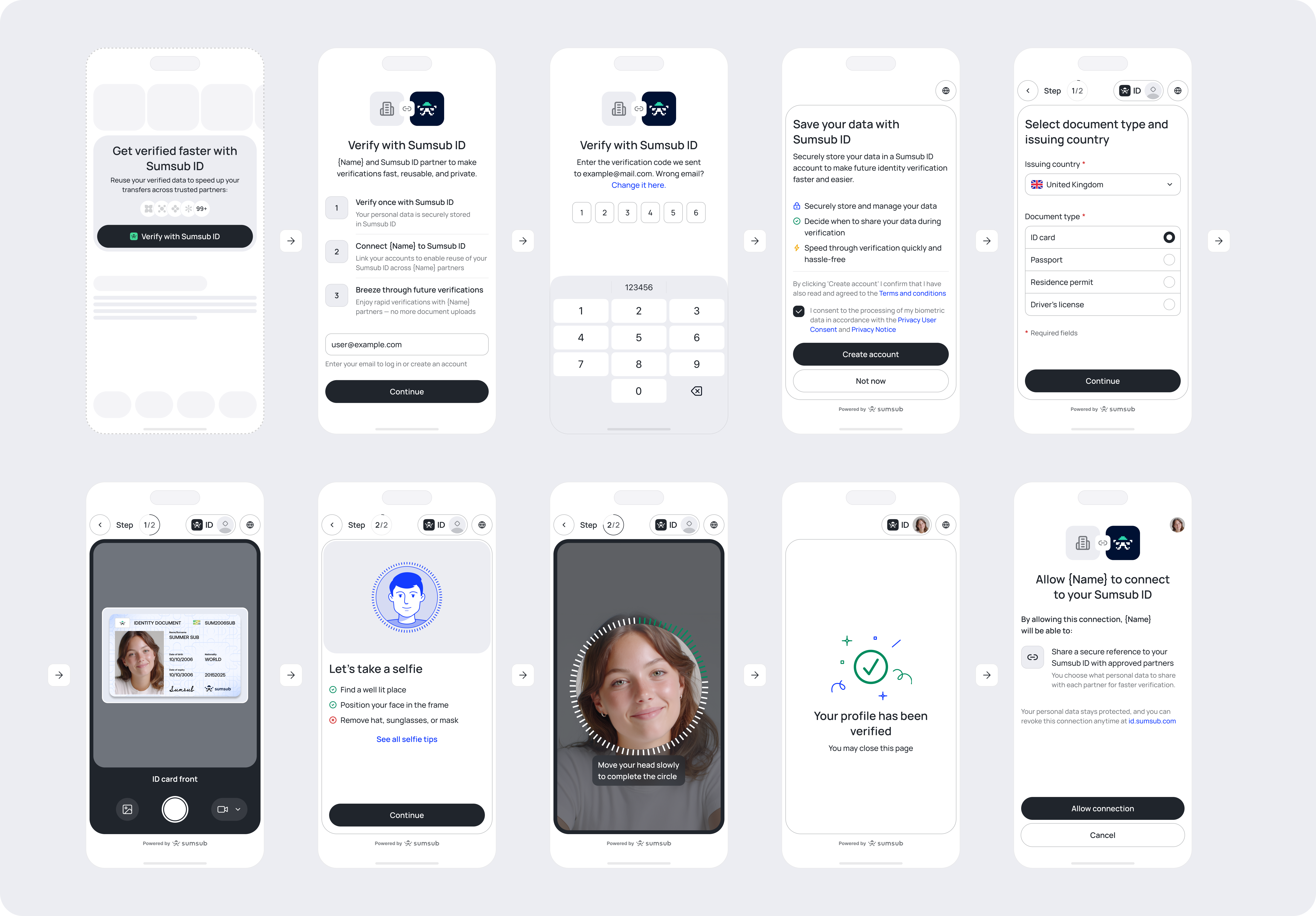
If Sumsub ID does not exist:
- Authentication. User provides and confirms their email address.
- Sumsub ID account creation. User will be prompted to create a Sumsub ID account.
- Verification. Sumsub runs the checks needed to provide the requested data. These checks depend on the scopes you ask for and the steps already completed by the applicant.
- Authorisation. User gives permission to reveal certain verified claims to integrating business.
How to integrate with Sumsub ID Connect
To integrate with Sumsub ID Connect, you need to:
- Get a client key, also known as a client ID, to use Sumsub services.
- Reach out to Sumsub support and ask to enable Sumsub ID Connect for your client key.
- Integrate the Sumsub ID — OIDC flow into your product. For detailed OIDC setup, supported scopes, and JavaScript library options, see this article.
Updated 4 months ago