
Add notes
Provide more clarity to the verification process by adding notes.
The Notes section is an optional feature in applicant profiles that can be used to add details that may be important for your team or Sumsub officers to consider. When performing a manual review of an applicant profile, notes help teams better understand unusual decisions and see the full context of the case.
The most common use case for Notes is requesting approval of an applicant profile or document regardless of a decision previously made by the system. For example, if you want to accept a document that was rejected as unsuitable, you can provide additional explanation using Notes.
Adding, editing, deleting, and pinning notes requires the Manage applicant notes permission. Reading notes requires either the View applicant notes or Manage applicant notes permission. For more information about user roles, refer to this article.
ImportantDo not use Notes to upload documents for verification. Documents relevant to the verification must be uploaded to the Documents section.
Attach notes
To add notes:
- Go to the Dashboard and navigate to Applicants.
- Open the required applicant profile and go to the Verification tab.
- Locate the Note section and enter necessary details.
- Add files and tags if needed.
- Click Add note.
System-generated notes
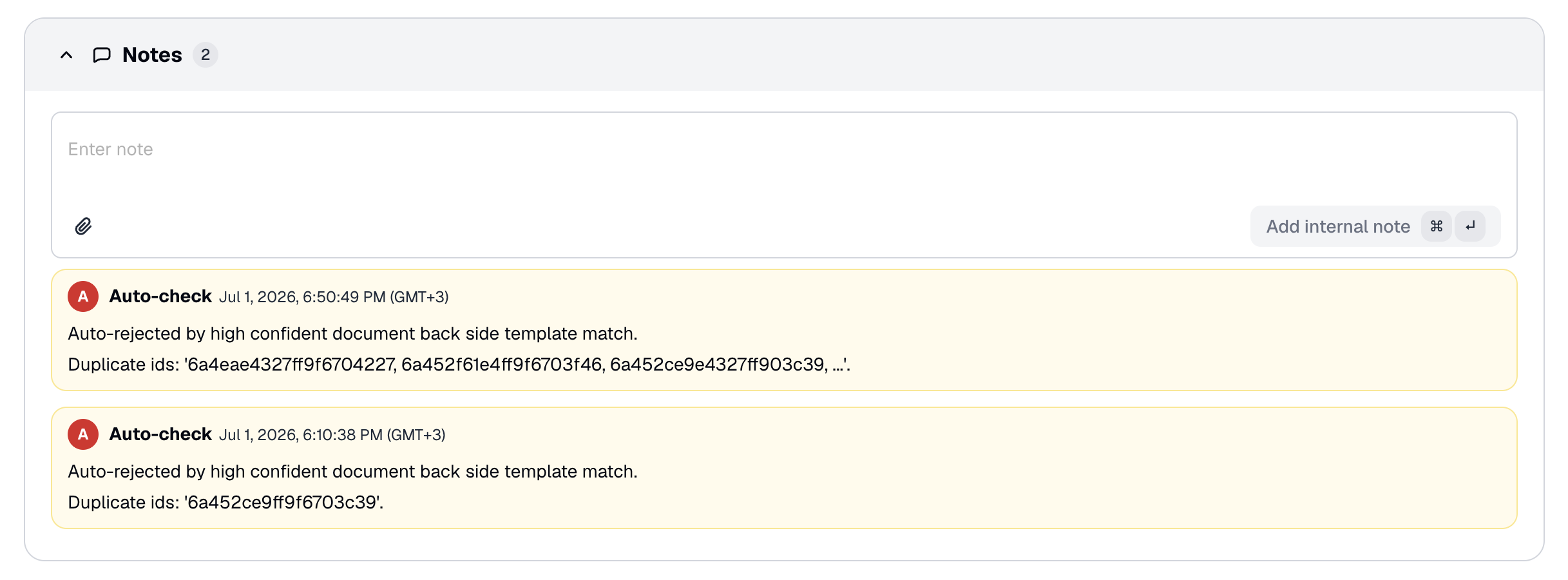
In addition to notes added manually, Sumsub can attach notes automatically to explain certain system decisions.
For example, when an applicant is auto-rejected because their document back side matches the template of other applicants documents (a fraud-duplicate check), Sumsub adds a note to the applicant profile stating the rejection reason and listing the IDs of the matching applicants.
This note appears in the Notes section alongside manually added notes, and is also returned via the API to users with the View applicant notes permission.
The note lists up to three duplicate applicant IDs (any additional IDs are shortened to , ...).
NoteSystem-generated notes are informational only. They are not processed or taken into account by automatic checks.
Updated 25 days ago