
Statuses, lifecycle, and outcomes
Track and interpret the state of the Travel Rule data exchange transaction.
Every Travel Rule data exchange has a status in travelRuleInfo.status. This status describes the state of the Travel Rule data exchange. It does not represent the review decision produced by your rules or the status of the blockchain transaction.
Travel Rule statuses are divided into two groups:
- Open statuses — the exchange can still transition to another status.
- Final statuses — the exchange has reached an end state and cannot be resumed or cancelled
NoteThe Travel Rule status and the review outcome are independent. For example, a transaction may be approved by your rules while its Travel Rule exchange has the
expiredstatus. The action your organization takes for each status depends on the Travel Rule rules configured in your account.
Open statuses
Open statuses indicate that the Travel Rule exchange is still in progress and may transition to another status depending on subsequent actions, responses, or timeout conditions.
| Status | Description | Possible transition |
|---|---|---|
awaitingCounterparty | The counterparty was identified and the request was delivered. The exchange is waiting for their response. | A counterparty response, compliance decision, or confirmation timeout. |
onHold | The exchange requires additional action from the responding side, such as wallet ownership confirmation, participant information, or compliance review. | A response, compliance decision, or confirmation timeout. |
awaitingOnChainTransfer | The Travel Rule data exchange completed successfully, but the blockchain transaction has not yet been linked. | Linking the blockchain transaction or cancelling the exchange. |
completed | Legacy name of awaitingOnChainTransfer. Exchanges that reached this status before the rename keep the completed value, and Sumsub does not rename them. | Linking the blockchain transaction or cancelling the exchange. |
Important
awaitingOnChainTransferdoes not indicate the end of the lifecycle. It confirms that the Travel Rule data exchange succeeded. Depending on the flow, the exchange may then transition automatically tofinishedor remainawaitingOnChainTransferuntil the blockchain transaction is linked.
Final statuses
Final statuses indicate that the Travel Rule exchange has reached an end state. Once assigned, these statuses do not transition further.
| Status | Description |
|---|---|
finished | The blockchain transaction ID has been linked to a completed exchange. This is the successful final state of the exchange. |
cancelled | The transfer was cancelled. This may occur because the sender decided not to proceed after the exchange completed or because the sender's rules rejected the transfer before the request was sent. |
expired | No response was received within the requesting party's confirmation timeout. |
unconfirmedOwnership | The wallet address was confirmed not to belong to the expected VASP or organisation. |
counterpartyMismatchedData | The counterparty reported that the participant information could not be reconciled with the information they hold. |
counterpartyVaspGeneralDecline | The counterparty declined the exchange without providing a more specific reason. |
counterpartyVaspNotFound | No VASP could be attributed to the counterparty wallet address. The destination is therefore treated as an unhosted wallet. |
counterpartyVaspNotReachable | The VASP was identified but cannot be reached through a protocol supported by both parties. Sumsub sends an email notification to the VASP, and the attempt is recorded under Events → Emails. |
notEnoughCounterpartyData | The available information was insufficient to create a valid Travel Rule message. For an exchange initiated by your organisation, this means the data you supplied did not meet the protocol requirements; it does not indicate a decline from the counterparty. |
notApplicable | The Travel Rule exchange was skipped according to your configuration, for example because the transaction was below the configured minimum amount or the counterparty is not treated as a VASP. |
NoteEmail notifications for
counterpartyVaspNotReachableare not sent in Sandbox. The status itself can still be reproduced in the Sandbox environment.
Exchange lifecycle
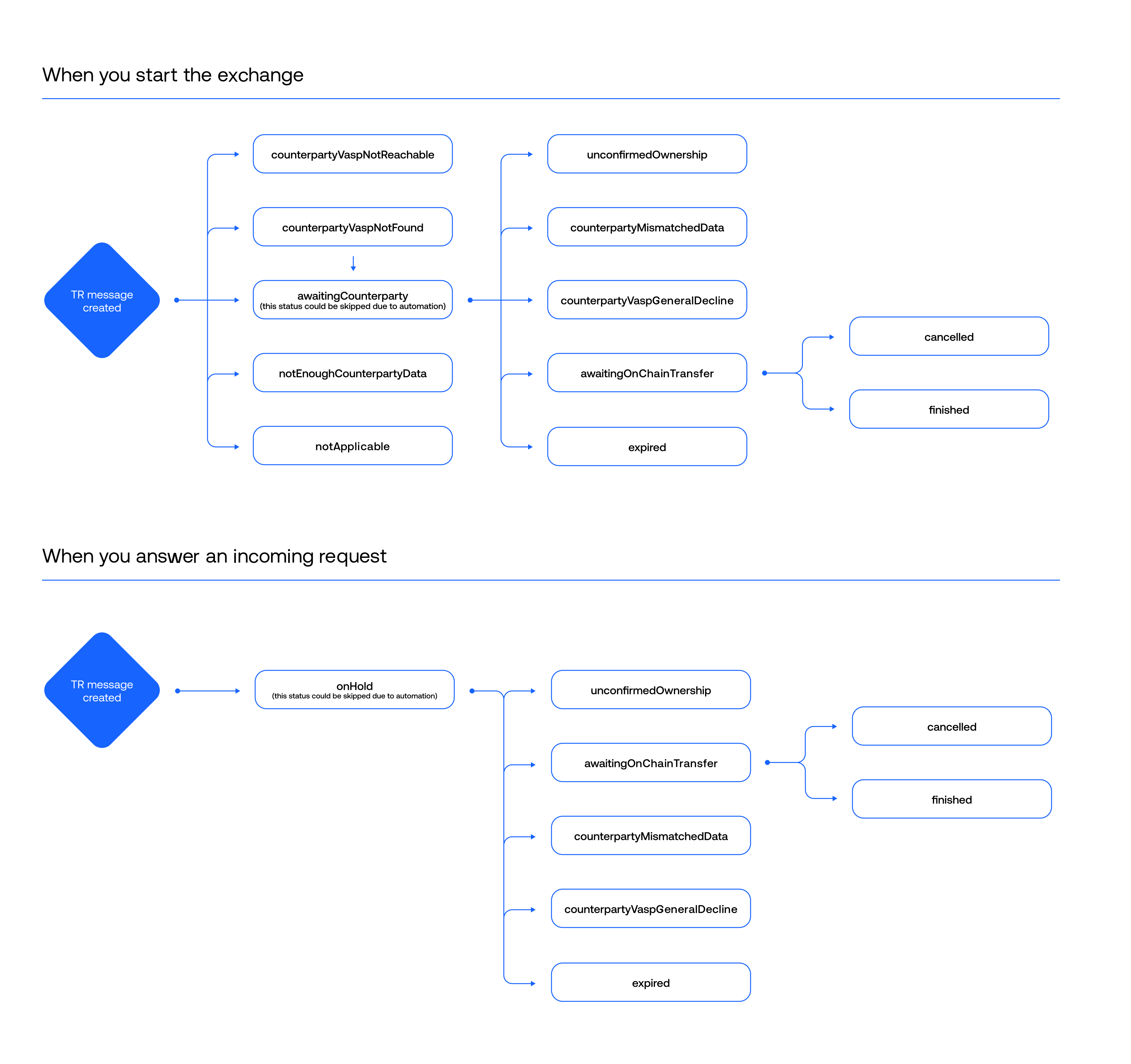
The Travel Rule exchange lifecycle depends on which party initiated the exchange, whether the required data can be exchanged successfully, and whether the blockchain transaction is ultimately completed.
Starting status
The initial status depends on whether your organisation initiated the exchange or is responding to one.
If you initiate the exchange, the standard initial status is awaitingCounterparty.
However, the exchange may immediately receive one of the following final statuses without entering awaitingCounterparty:
counterpartyVaspNotFound— the counterparty VASP cannot be identified.counterpartyVaspNotReachable— the VASP is identified but cannot be reached through a mutually supported protocol.notEnoughCounterpartyData— the supplied data is insufficient to create a valid Travel Rule message.notApplicable— the exchange is skipped according to your Travel Rule configuration.
If you answer an incoming Travel Rule request, the exchange arrives in onHold and remains there until the required response is provided.
Status transitions
The following transitions can occur during the exchange lifecycle:
| Transition | Description |
|---|---|
awaitingCounterparty → onHold | Transaction requires compliance review. |
awaitingCounterparty or onHold → awaitingOnChainTransfer | Required Travel Rule information has been successfully exchanged. |
awaitingCounterparty or onHold → expired | Confirmation timeout elapsed. These are the only statuses that can expire. |
awaitingCounterparty or onHold → unconfirmedOwnership, counterpartyMismatchedData, or counterpartyVaspGeneralDecline | Exchange was declined by the counterparty. |
awaitingCounterparty → cancelled | Sender's rules rejected the transfer before the request was sent. |
awaitingOnChainTransfer → finished | Blockchain transaction has been linked to the exchange. |
awaitingOnChainTransfer → cancelled | Sender decided not to proceed with the transfer. |
Finalizing exchange awaiting on-chain transfer
The finished status indicates that the Travel Rule exchange has been linked to the blockchain transaction that was actually broadcast.
How an exchange reaches finished depends on when it was created and which party initiated it.
| Scenario | How the exchange reaches finished |
|---|---|
| You initiated the exchange before settlement. | Submit the blockchain transaction ID after broadcasting the transaction. |
| You initiated the exchange after settlement. | No additional action is required. The transaction ID was provided when the exchange was created, so Sumsub links it after the counterparty responds. |
| You responded to an exchange initiated by another party. | No additional action is required. The initiating party provides the blockchain transaction ID. |
For exchanges initiated before settlement, use this API method and provide the transaction hash in paymentTxnId.
Submit the transaction ID after the transfer is broadcast. Sumsub forwards it to the counterparty, allowing both parties to associate the Travel Rule exchange with the corresponding on-chain transaction.
NoteOnly exchanges that you initiated before settlement require an additional API request. In the other scenarios, the exchange transitions to
finishedautomatically. There is no need to poll for the transition or call the update endpoint to trigger it.
Cancelling exchange awaiting on-chain transfer
If the sender decides not to broadcast the transfer after the Travel Rule exchange has completed, cancel the exchange using this API method.
Cancelling the exchange informs the counterparty that the transfer will not proceed and prevents the exchange from remaining open unnecessarily.
Expired exchanges
If the confirmation timeout elapses before the required response is received, Sumsub sets the exchange to expired for both parties and re-evaluates the transaction according to the rules configured in each account.
ImportantThe resulting review decision depends on each organisation Travel Rule configuration. There is no platform-wide default action for expired exchanges. If your organisation requires a specific action when a counterparty does not respond, configure the corresponding rule. For more information, refer to this Travel Rule workflow customization.
Transactions without Travel Rule status
In rare cases, a Travel Rule transaction may have no value in travelRuleInfo.status.
This does not represent a lifecycle status and should not be handled as a normal exchange state. It indicates that the exchange did not progress far enough for a Travel Rule status to be assigned.
If you encounter transactions without a Travel Rule status, contact Sumsub Support and provide the affected transaction IDs. Such cases are typically related to account configuration rather than the transaction request itself.
Updated about 11 hours ago