
Sumsub ID Connect – Partner sharing
Sumsub ID Connect also supports multi-party verification flows with a partner sharing integration. In this sharing scheme, we refer to the business that integrates Sumsub ID Connect as the donor. The donor enables end users to connect their Sumsub ID account and initiate sharing with partner clients.
We refer to partners that receive verification data and provide the reuse experience as recipients. Recipients consume verification data from Sumsub ID after the end user authorizes sharing for the recipient client.
NoteDonor is not the source of the reused documents or verification results. Sumsub retrieves the reused data from the connected Sumsub ID account, based on the end user's authorization.
How partner sharing with Sumsub ID Connect works
The partner sharing flow consists of three main steps:
- The donor establishes a connection using Sumsub ID Connect and requests the
sharescope to obtain the applicant’s permission for sharing verified data. - After establishing the connection, the donor service generates a Sumsub ID share token and sends it to the recipient partner.
- The recipient partner uses the Sumsub ID share token either in our SDK or via API to conduct a fast verification based on the applicant’s existing Sumsub ID data.
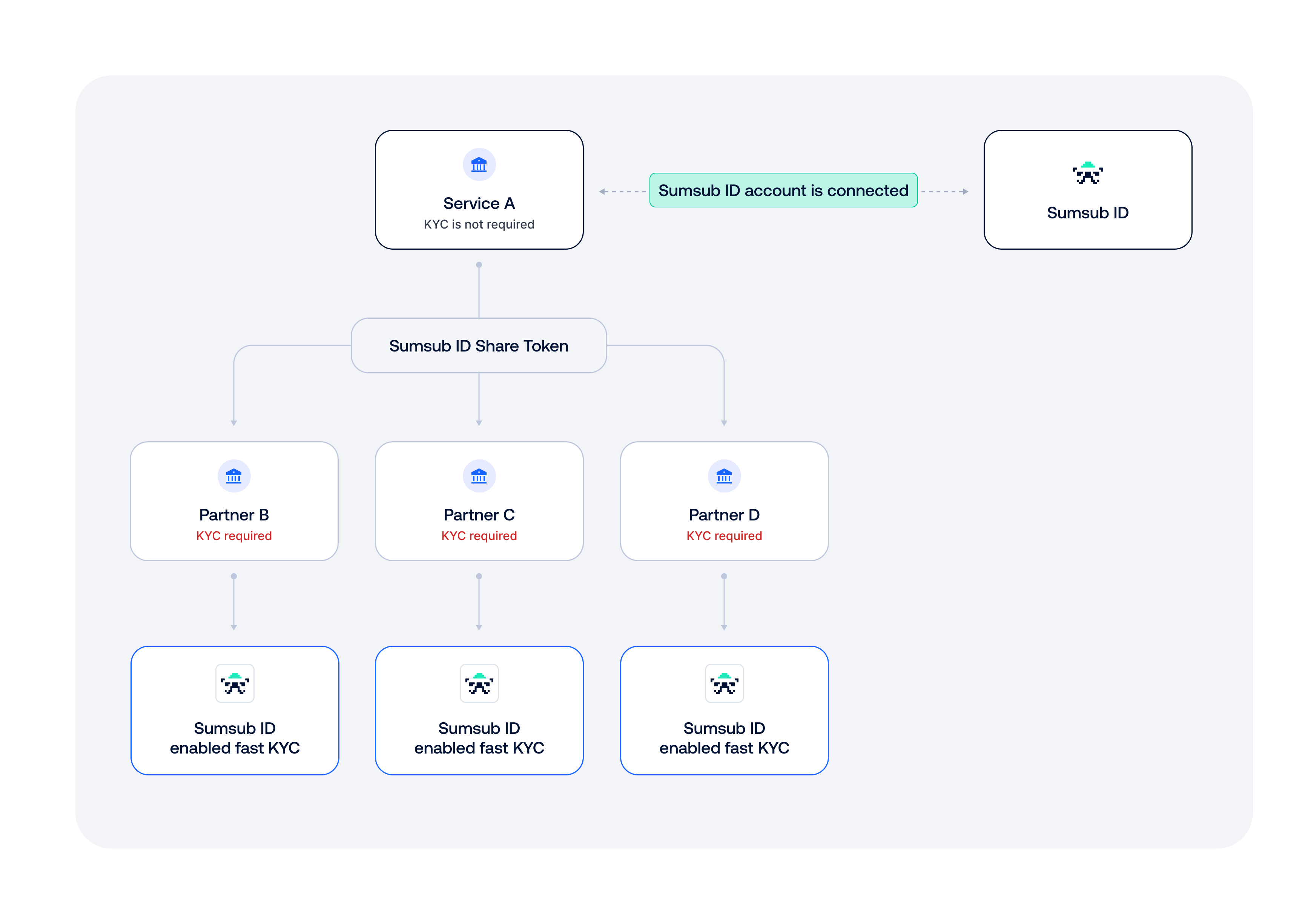
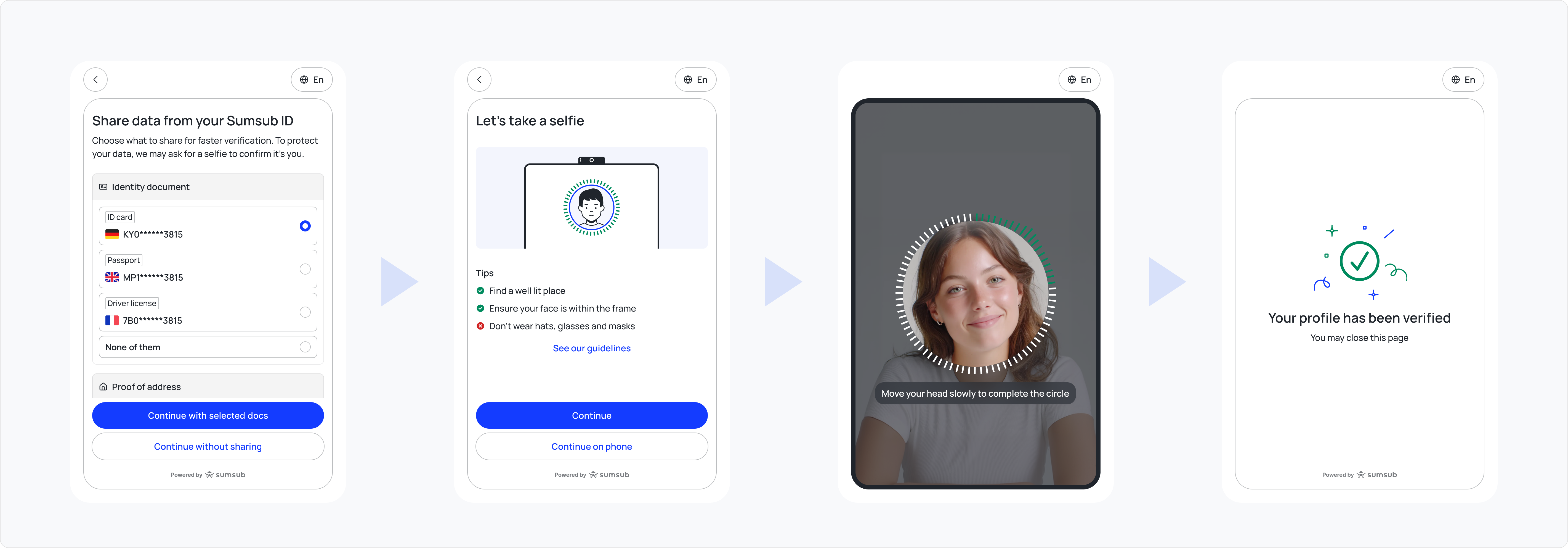
When an applicant needs to verify with a recipient, they can reuse documents from their connected Sumsub ID and prove ownership with a quick selfie. This approach removes manual document uploads and still supports fully compliant KYC, as all checks run according to the partner’s configuration.
NoteFor more details on Sumsub ID supported verification flows, see this article.
Setup on donor side
The business integrates Sumsub ID Connect as described here, so that users can link their service account to a Sumsub ID account.
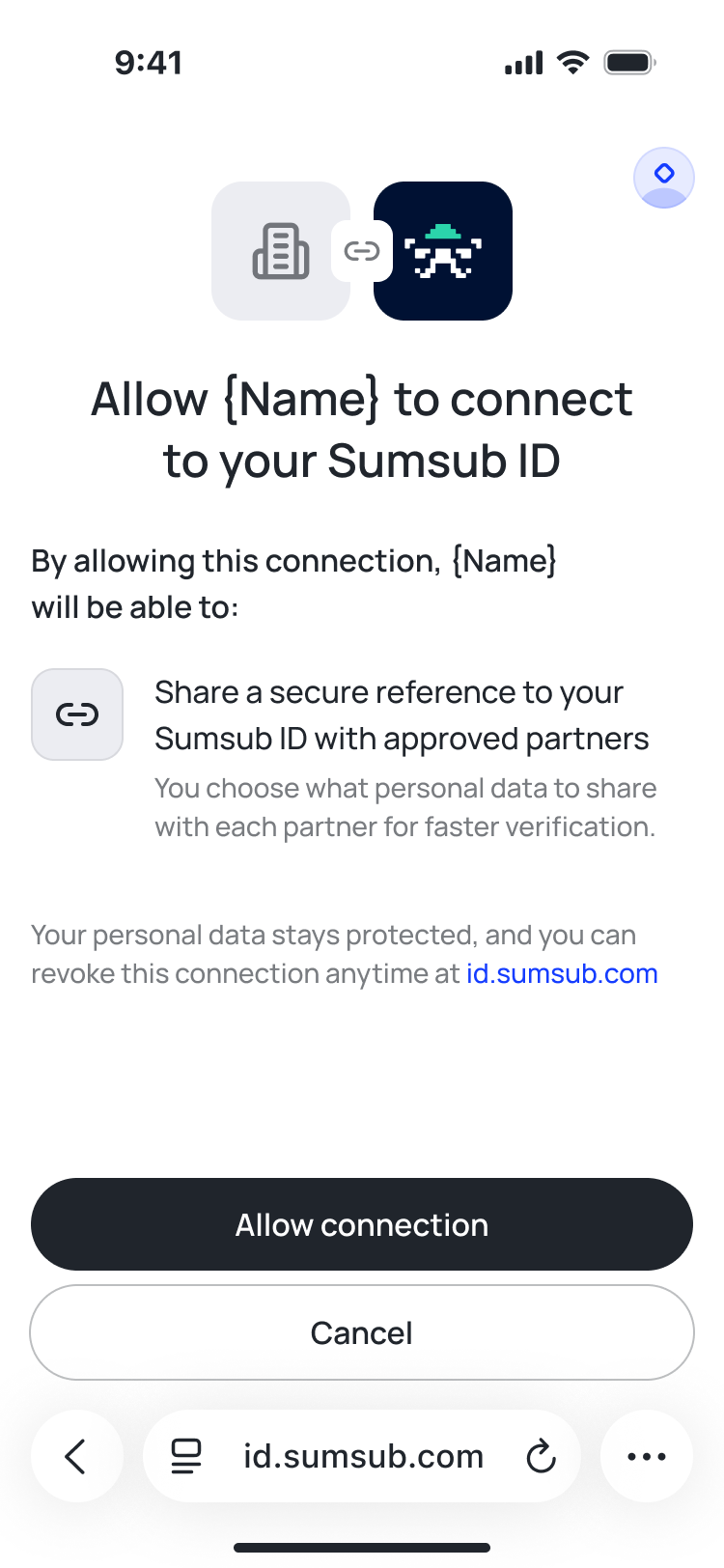
During this integration, the business includes the share scope into the request. This scope adds a specific permission to the authorization screen that allows the service to generate a Sumsub ID share token.
The authorisation screen will look like this:
NoteAdd your recipient partner to the Recipients list. For more information on how to do this, see this article.
Generate Sumsub ID share token
After the service obtains the share scope, it can generate a Sumsub ID share token. To do so, use this API method.
Request example:
curl -X POST \
     'https://api.sumsub.com/resources/accessTokens/sumsubIdShareToken' \
     -H 'content-type: application/json' \
     -d '{
          "sumsubIdConnectToken": "snd-id-con-a-WRT7FRBRfdejpsDR8a_cYeX9BU32QP_I_Hyc93saZcg5965PfGzrHGDEdrTRseop",
          "forClientId": "CoolCompanyLtd",
          "ttlInSecs": "1800"
        }'
Authorisation for sharing via API
If a recipient wants to share Sumsub ID data via API, they must first collect an additional permission from the end user through the share consent screen. Sumsub requires this step to meet data privacy obligations.
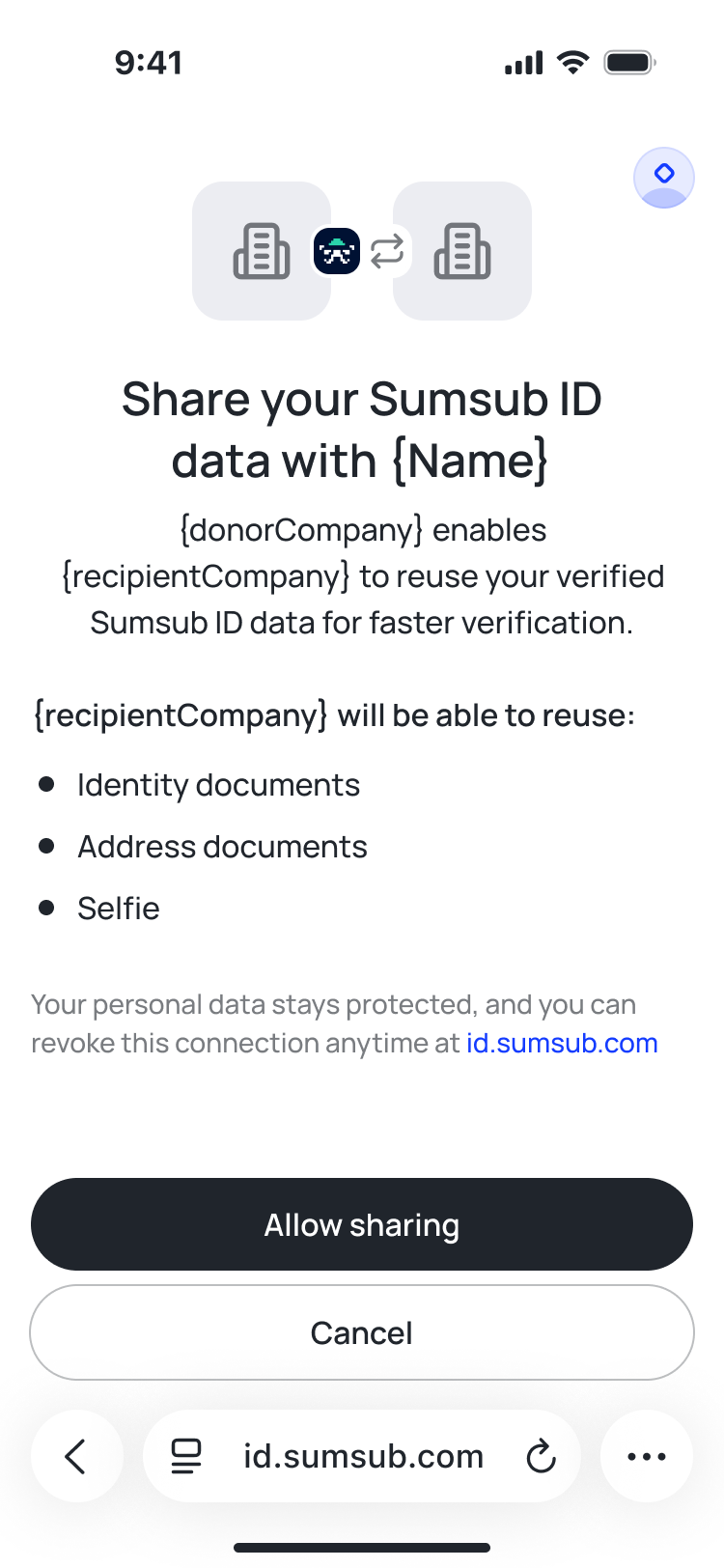
Sumsub records whether the end user has granted this permission for a specific Sumsub ID to share with a specific recipient.
When you generate a Sumsub ID share token, the response includes the sharingAllowed field. It indicates whether the Sumsub ID account has already authorized data sharing with the client specified in the forClientId field.
Response example:
{
    "token": "_act-snsId-08c4d85d-d0ae-43d6-81e9-a57d4f8e3768",
    "forClientId": "internal_staff",
    "sharingAllowed": true
}
If sharingAllowed is false, the end user must grant permission via an authorization screen to enable sharing via API.
To collect this permission, perform the following steps:
- Before opening the share consent screen, use this API method to request a share link. Request example:
curl --request POST \ --url https://api.sumsub.com/resources/snsId/oauth/shareLink \ --header 'Authorization: Bearer token' \ --data '{ "redirectUri": "<your_redirect_uri>", "forClientId": "CoolCompanyLtd", "displayMode": "page", "state": "<your_custom_state>" }' - Sumsub will return a short-lived link that you can redirect the end user to.
- Then the applicant has to accept or decline sharing their data. Regardless of the action, we do the following:
- Generate a signed JWT containing
sharingAllowed(trueif accepted,falseif declined), the original state, and other relevant fields. - We redirect the user to the link you specified in the
redirectUrifield, adding the JWT as atokenquery parameter.
{ "token": "jwt_token" } - Generate a signed JWT containing
After the applicant grants this permission, the recipient partner can retrieve Sumsub ID data as described below.
Setup on recipient side
Recipients have to complete the following one-time steps to start getting the improved verification flow:
- Get a client key (client ID) to use Sumsub services.
- Ask Sumsub support to enable Sumsub ID Connect for your client key.
- Add the integrating business to the Donors list. For more information on how to do so, see this article.
Recipients can choose to reuse the Sumsub ID data either by API or SDK.
Reuse via API
To retrieve documents from Sumsub ID via the API in this scheme, use the same flow as Reusable KYC via API.
- Donor generates a Sumsub ID share token.
- Donor passes the Sumsub ID share token to the recipient partner.
- Recipient partner uses this API method and provides the Sumsub ID share token as a request parameter.
Request example:
 curl -X POST \
    'https://api.sumsub.com/resources/api/reusableIdentity/reuse?shareToken=_act-jwt-eyJhbGciOiJub25lIn0.eyJqdGkiOiJfYWN0LTE3YjM5YTljLWRhOWUtNGY2MS04Y2ZjLTYwNzViNWM2NDk5MSIsInVybCI6Imh0dHA6Ly9sb2NhbGhvc3Q6ODA5MCJ9.&levelName=liveness-id-poa'
Sumsub checks that the connected Sumsub ID account has granted permission to share data via API with the specified recipient partner.
ImportantTo use this integration, the recipient partner must have the Reusable KYC service enabled. Contact our support team at [email protected] to request access.
Reuse via SDK
When the recipient receives the Sumsub share token, they can include it when generating an access token to initialize the WebSDK, by including the share token. This automatically triggers the Sumsub ID reuse flow.
Request example:
curl --request POST \
    --url https://api.sumsub.com/resources/accessTokens/sdk \
     --header 'content-type: application/json' \
     --data '
            {
              "applicantIdentifiers": {
                "email": "[email protected]",
                "phone": "555-1111"
              },
              "ttlInSecs": 600,
"shareToken":_act-snsId-08c4d85d-d0ae-43d6-81e9-a57d4f8e3768",
              "userId": "johndoeID",
              "levelName": "basic-kyc-level"
            }'
The end-user flow will look like this:
Updated 2 months ago