---
updatedAt: 2026-08-31T06:24:59.000Z
---

Fetch the complete documentation index at: https://docs.sumsub.com/llms.txt. Use this file to discover all available pages before exploring further. Append .md to any documentation page URL to get its markdown version.

# About User Verification

Build consistent verification flows that balance compliance and conversion.

<HTMLBlock>{`
<style>
  .App {
    --hub-toc-width: 0px;
    --hub-main-max-width: 1138px;
  }
  .content-toc {
    display: none;
  }
</style>
`}</HTMLBlock>

Use User Verification to confirm users are genuine and assess risk before granting access to your products or services.

Combine identity checks, biometrics, database validation, screening, and other verification methods into workflows tailored to your markets and requirements, helping you reduce fraud, improve onboarding, and meet KYC, AML and other compliance obligations.

Sumsub offers an all-in-one verification platform featuring customizable solutions for

* Identity verification
* Address verification
* Screening, risk and monitoring
* Payment Verification
* Reusable Identity
* Configuration and automation
* Results and operations

# Benefits of Sumsub User Verification

Balance uncompromising compliance with a seamless, high-converting onboarding experience using Sumsub:

* Instantly verify 14,000+ document types from 220+ countries and territories.
* Handle routine compliance steps with smart automation, cutting manual review workloads by up to 94%.
* Break down communication barriers with interfaces supported in 50+ languages.
* Onboard legitimate applicants in around 20 seconds on average and achieve an average pass rate of 90% due to smooth user experience.

# How Sumsub User Verification works

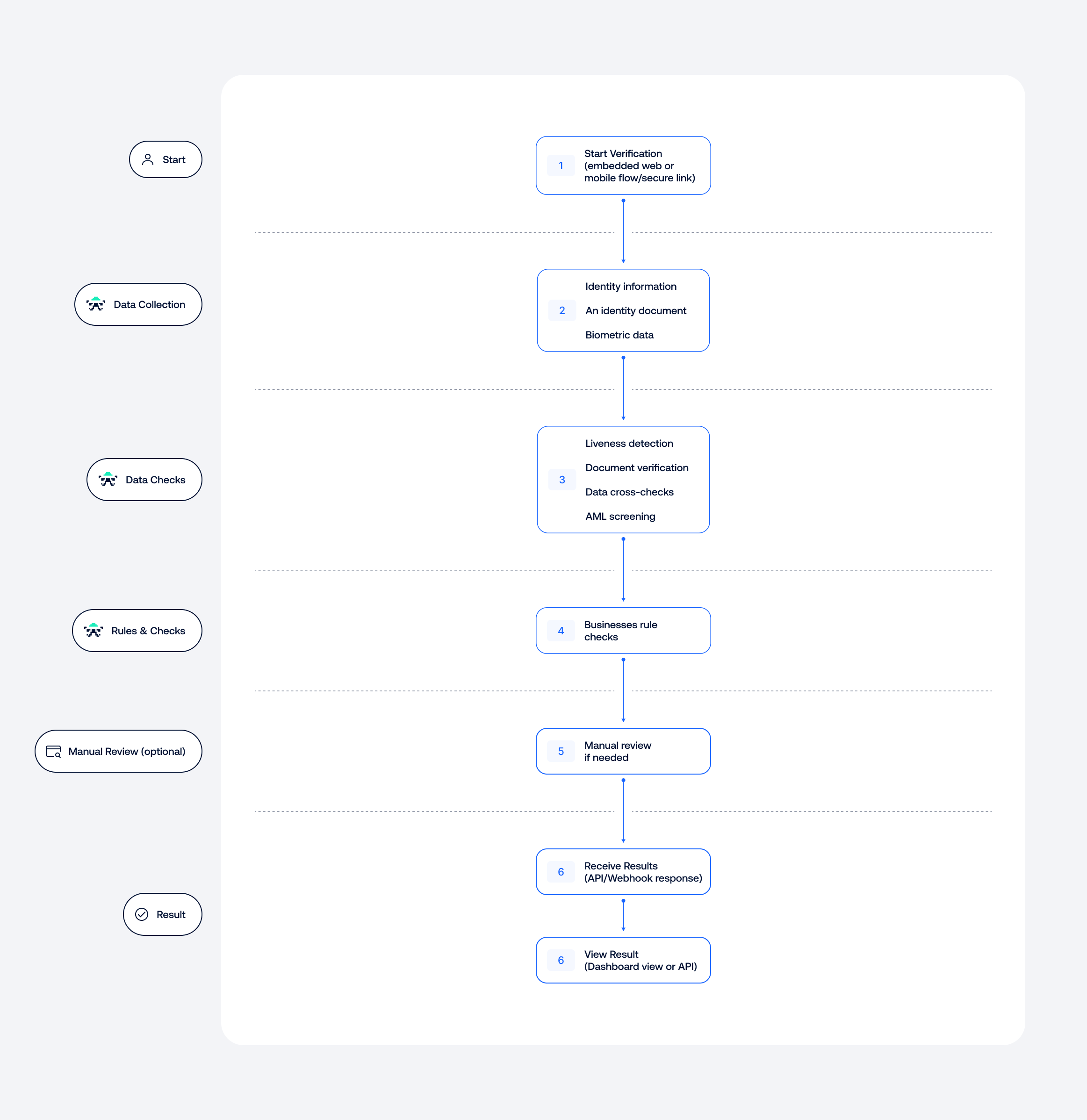
The scheme below explains the main user verification steps.&#x20;

![](https://files.readme.io/afa561a5e7fa80a544f20dd5ae6db7c8c46497835b1bfb2a8d09a353389fdeac-User_Verfication_Workflow-1.png)

<br />

**Step 1: Data collection**

The applicant starts verification through an embedded web or mobile flow, or via a secure verification link.

Depending on the workflow, they may be asked to provide the following:

* Identity information, such as their name, date of birth, and ID number.
* An identity document, such as a passport, driver's license, or national ID card<br />Biometric data, such as a selfie or liveness check.

Information can be entered by the applicant or extracted automatically from their identity document.

**Step 2: Checks and decisioning**

The collected data is processed using the checks and rules configured in your workflow.

These may include:

* Liveness detection to identify deepfakes and impersonation attempts.
* Document verification to check authenticity, validity, and security features.
* Data cross-checks to identify mismatches between sources.
* AML screening against sanctions, PEP, and adverse media databases.

The results are evaluated against your business rules. Cases requiring further investigation can be routed for manual review.

**Step 3: Verification result**

Once all required checks are complete, a final result is generated. You can view it in the dashboard or receive it through an API response or webhook.

<Callout icon="📘" theme="success">
  ### Related topics on SumsubCare

  - [Concerns about verification result](https://care.sumsub.com/en/articles/712280-concerns-about-verification-result)
  - [Reviewing verification results](https://care.sumsub.com/en/collections/1431658-reviewing-verification-results)
  - [Understanding rejection reasons](https://care.sumsub.com/en/collections/1431659-understanding-rejection-reasons)
</Callout>

# User Verification use cases

There is no one-size-fits-all approach to verification. The right checks depend on your regulatory requirements, risk appetite, and the level of assurance needed for each user or action.

Sumsub lets you combine verification methods and build workflows that balance security, compliance, and user experience. Here are some common examples.

| New user onboarding                                                                     | Non-Doc onboarding                                                                                                                                                         | Re-verification                                                                                                                                                   | High-assurance verification                                                                                                               | Regulated identity verification                                                                                                                     |
| --------------------------------------------------------------------------------------- | -------------------------------------------------------------------------------------------------------------------------------------------------------------------------- | ----------------------------------------------------------------------------------------------------------------------------------------------------------------- | ----------------------------------------------------------------------------------------------------------------------------------------- | --------------------------------------------------------------------------------------------------------------------------------------------------- |
| Verify applicants using standard government-issued IDs, a selfie, and automated checks. | Verify identity details such as name, date of birth, and address against trusted government, credit bureau, and utility databases, without requiring an identity document. | Quickly reconfirm an existing user's identity when it matters—after inactivity, before high-risk actions, or as part of scheduled reviews, with minimal friction. | Add greater assurance to high-risk accounts and transactions by combining document verification, liveness detection, and NFC chip checks. | Meet strict regional requirements, including BaFin and SEPBLAC, with high-assurance video identification and legally binding electronic signatures. |

# Get started with User Verification

Getting started with Sumsub user verification is simple and doesn’t require any coding. All you need to do is set up your integration and configure the verification logic in the Dashboard.

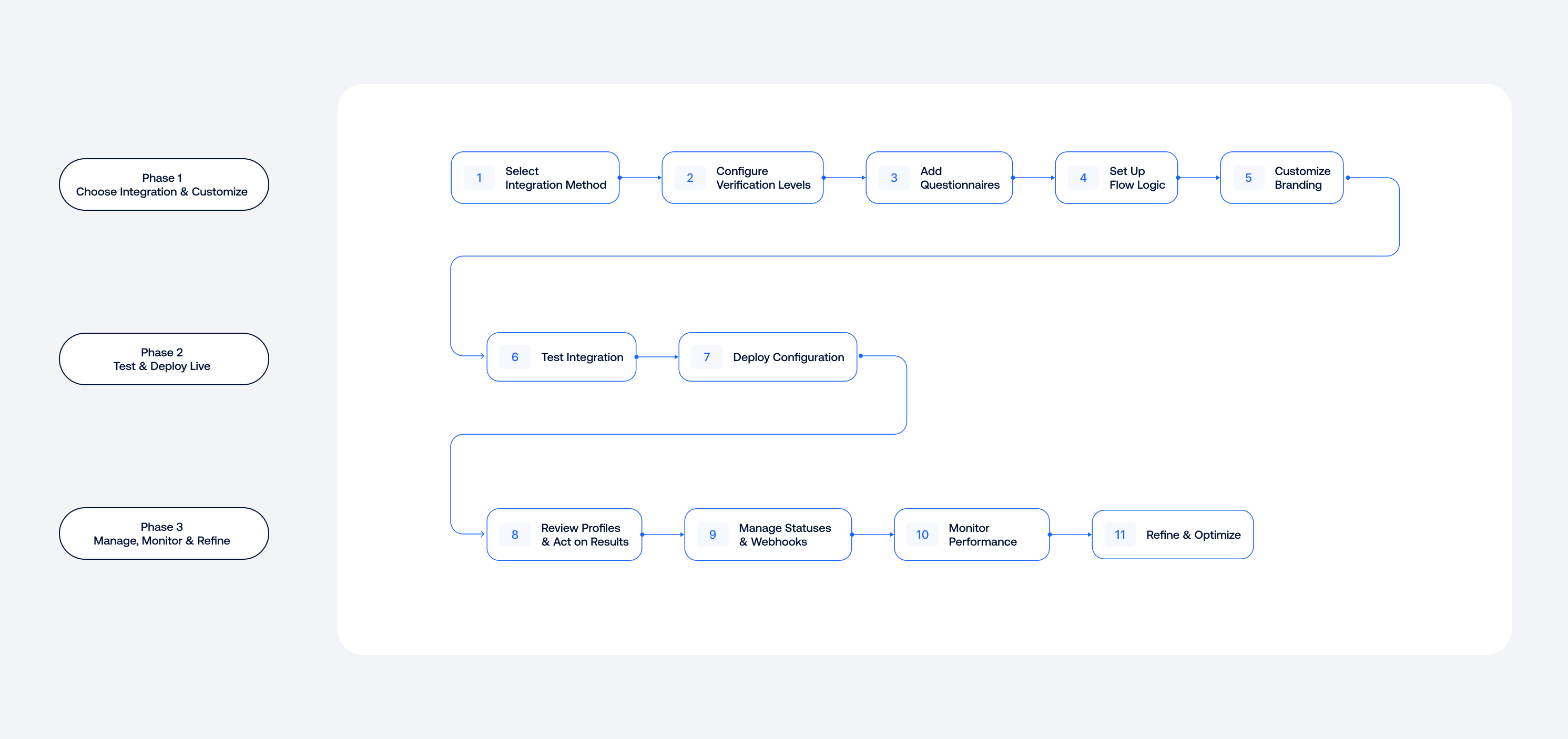
The scheme below explains how to set up User Verification.&#x20;

![](https://files.readme.io/2a9a850f7a87f8ca07141fe5dae1551c15d12f658d19295ad830bac60188df7c-User_Verfication__Setup_and_Management_Workflow-1.png)

<br />

1. Choose <Anchor target="_blank" href="doc:about-web-sdk">WebSDK</Anchor>, <Anchor target="_blank" href="doc:about-mobile-sdk">MobileSDK</Anchor>, or <Anchor target="_blank" href="ref:get-started-with-api">API</Anchor> and initiate the integration.
2. <Anchor target="_blank" href="doc:verification-levels">Configure at least one verification level</Anchor> to select the checks your applicants will pass.
3. <Anchor target="_blank" href="doc:questionnaire">Add questionnaires</Anchor> to collect additional information.
4. Set up the verification flow.
5. Customize the <Anchor target="_blank" href="doc:sdk-customization">look and feel of your applicant’s journey</Anchor>.
6. [Test your integration](https://docs.sumsub.com/sumsub/docs/test-in-sandbox) with <Anchor target="_blank" href="doc:verification-document-templates">premade document templates</Anchor> to ensure all steps are set up correctly and then go live.
7. [Review applicant profiles](https://docs.sumsub.com/sumsub/docs/review-results-in-applicant-profile) and act on verification results.
8. <Anchor target="_blank" href="doc:receive-verification-results">Manage verification statuses</Anchor>, associated webhooks, and rejection labels.
9. Analyze your product performance data and applicant activities.

To learn more about the key steps, refer to the articles below.

<HTMLBlock>{`
<div style="margin-top: 30px;"></div>
`}</HTMLBlock>

<HTMLBlock>{`
<style>
   .box5 {
   background: #FFFFFF;
   border: 1px solid #E1E5EA;
   border-radius: 12px;
   align-items: top;
   display: grid;
   text-decoration: none !important;
   grid-template-rows: min-content auto;
   transition:  0.3s ease-in !important;
   } 
   .box5 text-basic {
   padding: 0px 24px 24px 24px;
   font-style: normal;
   font-weight: 400;
   font-size: 14px;
   line-height: 24px;
   color: #586073;
   }
   @media (prefers-color-scheme: dark) {
   [data-color-mode="system"] .box5 text-basic {
   color: #fff;
   opacity: 0.8;
   }
   }
   [data-color-mode="dark"] .box5 text-basic {
   color: #fff;
   opacity: 0.8;
   } 
   .box5:hover {
   box-shadow: 0px 2px 6px 1px rgba(4, 29, 47, 0.1); 
   transition:  0.3s ease-in;
   }
   @media (prefers-color-scheme: dark) {
   [data-color-mode="system"] .box5 {
   background: #20252C;
   border: 1px solid #333844;
   }
   }
   [data-color-mode="dark"] .box5 {
   background: #20252C;
   border: 1px solid #333844;
   }  
   .text5-h1 {
   font-style: normal;
   font-weight: 500;
   font-size: 15px;
   line-height: 24px;
   color: #377CF7;
   transition:  0.3s ease-in;
   padding: 16px 24px 8px 24px;
   }
   @media (prefers-color-scheme: dark) {
   [data-color-mode="system"] .text5-h1 {
   color: #fff;
   }
   }
   [data-color-mode="dark"] .text5-h1 {
   color: #fff;
   } 
   .box5:hover .text5-h1 {
   color: #377CF7;
   opacity: 0.8;
   transition:  0.3s ease-in;
   }  
   .img5 {
   margin: 16px 0px -10px 0px !important;
   width: 100%;
   height: auto;
   }  
   .line {
   border-top: 1px solid #E1E5EA;
   margin-bottom: 8px;
   margin-top: 10px;
   }
   @media (prefers-color-scheme: dark) {
   [data-color-mode="system"] .line {
   color: #fff;
   opacity: 0.2;
   }
   }
   [data-color-mode="dark"] .line {
   color: #fff;
   opacity: 0.2;
   } 
</style>
   <div class="columns-container">
      <a class="box5" href="/docs/kyc-settings-wizard">
         <div class="text5-h1">Set up your integration</div>
         <text-basic>Map out the ideal verification journey for your users with the KYC Settings Wizard. Enable standard compliance requirements, select supported countries, and apply default rules in minutes.</text-basic>
      </a>
      <a class="box5" href="/docs/get-started-with-workflow-builder">
        <div class="text5-h1">Configure verification flow</div>
<text-basic>Create automated "if/then" pathways routing applicants through different verification steps based on their country of residence, risk score, age, or specific document outcomes.</text-basic>
      </a>
      <a class="box5" href="/docs/cross-check-rules">
         <div class="text5-h1">Compare data from multiple sources</div>
         <text-basic>Create your internal blocklists, allowlists, and custom watchlists. Import, organize, and screen new applicants against these lists to instantly catch returning fraudsters or streamline onboarding for trusted users.</text-basic>
      </a>
      <a class="box5" href="/docs/client-lists">
         <div class="text5-h1">Categorize applicants based on custom parameters</div>
         <text-basic>Reduce address processing time to less than 1 min, regardless of the language or PoA document. You can also verify user addresses with databases and geolocation.</text-basic>
      </a>
      <a class="box5" href="/docs/review-results-in-applicant-profile">
         <div class="text5-h1">Handle verification results</div>
         <text-basic>Review individual or business applicant profiles, inspecting extracted document data, analyzing face match confidence scores, and making final approval or rejection decisions with confidence.</text-basic>
      </a>
      <a class="box5" href="/docs/dashboard-analytics">
         <div class="text5-h1">Leverage performance analytics</div>
         <text-basic>Turn verification data into actionable business intelligence: track pass rates, identify drop-off points in your onboarding funnel, measure processing times, and more.</text-basic>
      </a>
   </div>
   <div style="margin-top: 20px;"></div>
`}</HTMLBlock>

Take our free <Anchor target="_blank" href="https://www.sumsub.academy/courses/user-verification">User Verification course</Anchor> developed by industry experts.

# Create custom user verification flows

Below is an overview of Sumsub’s key verification features and how they work to help you build an optimized, compliant workflow.

## Identity verification

<HTMLBlock>{`
<div style="margin-top: 30px;"></div>
`}</HTMLBlock>

<HTMLBlock>{`
<style>
   .box5 {
   background: #FFFFFF;
   border: 1px solid #E1E5EA;
   border-radius: 12px;
   align-items: top;
   display: grid;
   text-decoration: none !important;
   grid-template-rows: min-content auto;
   transition:  0.3s ease-in !important;
   } 
   .box5 text-basic {
   padding: 0px 24px 24px 24px;
   font-style: normal;
   font-weight: 400;
   font-size: 14px;
   line-height: 24px;
   color: #586073;
   }
   @media (prefers-color-scheme: dark) {
   [data-color-mode="system"] .box5 text-basic {
   color: #fff;
   opacity: 0.8;
   }
   }
   [data-color-mode="dark"] .box5 text-basic {
   color: #fff;
   opacity: 0.8;
   } 
   .box5:hover {
   box-shadow: 0px 2px 6px 1px rgba(4, 29, 47, 0.1); 
   transition:  0.3s ease-in;
   }
   @media (prefers-color-scheme: dark) {
   [data-color-mode="system"] .box5 {
   background: #20252C;
   border: 1px solid #333844;
   }
   }
   [data-color-mode="dark"] .box5 {
   background: #20252C;
   border: 1px solid #333844;
   }  
   .text5-h1 {
   font-style: normal;
   font-weight: 500;
   font-size: 15px;
   line-height: 24px;
   color: #377CF7;
   transition:  0.3s ease-in;
   padding: 16px 24px 8px 24px;
   }
   @media (prefers-color-scheme: dark) {
   [data-color-mode="system"] .text5-h1 {
   color: #fff;
   }
   }
   [data-color-mode="dark"] .text5-h1 {
   color: #fff;
   } 
   .box5:hover .text5-h1 {
   color: #377CF7;
   opacity: 0.8;
   transition:  0.3s ease-in;
   }  
   .img5 {
   margin: 16px 0px -10px 0px !important;
   width: 100%;
   height: auto;
   }  
   .line {
   border-top: 1px solid #E1E5EA;
   margin-bottom: 8px;
   margin-top: 10px;
   }
   @media (prefers-color-scheme: dark) {
   [data-color-mode="system"] .line {
   color: #fff;
   opacity: 0.2;
   }
   }
   [data-color-mode="dark"] .line {
   color: #fff;
   opacity: 0.2;
   } 
</style>
   <div class="columns-container">
      <a class="box5" href="/docs/identity-verification">
         <div class="text5-h1">ID verification</div>
         <text-basic>Leverage AI-driven OCR to quickly extract document data and run layered authenticity checks to detect physical forgery, electronic editing, and digital tampering.</text-basic>
      </a>
      <a class="box5" href="/docs/database-validation">
         <div class="text5-h1">Database validation</div>
         <text-basic>Cross-check and match user credentials directly against trusted national databases and commercial registries for real-time validation.</text-basic>
      </a>
      <a class="box5" href="/docs/liveness">
         <div class="text5-h1">Biometric verification</div>
         <text-basic>Combat spoofing with 3D liveness detection to ensure a real user is physically present, and automatically match their facial scan against their submitted ID photo.</text-basic>
      </a>
      <a class="box5" href="/docs/nfc-based-id-verification">
         <div class="text5-h1">NFC-based ID Verification</div>
         <text-basic>Read encrypted chip data directly from modern e-passports and biometric IDs to achieve a near-zero fraud rate with zero manual entry.</text-basic>
      </a>
      <a class="box5" href="/docs/qualified-electronic-signature-qes-verification">
        <div class="text5-h1">Qualified Electronic Signature (QES) Verification</div>
  <text-basic>Combine secure identity verification with the authentication of a legally-binding electronic signature in a single eIDAS-compliant flow.</text-basic>
      </a>
      <a class="box5" href="/docs/no-document-verification">
         <div class="text5-h1">Non-Doc Verification</div>
         <text-basic>Fast-track your customer journey by verifying identities in seconds without requiring users to photograph, scan, or upload physical ID documents.</text-basic>
      </a>
      <a class="box5" href="/docs/video-identification">
         <div class="text5-h1">Video Identification</div>
         <text-basic>Video Identification
Deliver secure, high-assurance identity proofing by instantly connecting applicants with certified verification experts in a guided video call.</text-basic>
      </a>
      <a class="box5" href="https:/docs/german-eid-verification">
         <div class="text5-h1">German eID Verification</div>
         <text-basic>Streamline German customer onboarding with a fully localized, BaFin-compliant electronic identity (eID) verification flow powered by secure NFC technology.</text-basic>
      </a>
      <a class="box5" href="/docs/real-time-identification-recording">
         <div class="text5-h1">Real-time Identification Recording</div>
         <text-basic>Capture a continuous recording of the user's screen and camera during onboarding to secure an audit-ready visual trail that confirms zero third-party manipulation aligned to meet the SEPBLAC requirements.</text-basic>
      </a>
   </div>
   <div style="margin-top: 20px;"></div>
`}</HTMLBlock>

## Address verification

<HTMLBlock>{`
<div style="margin-top: 30px;"></div>
`}</HTMLBlock>

<HTMLBlock>{`
<div class="columns-container">
    <a class="box5" href="/docs/document-based-poa">
        <div class="text5-h1">Document-based Proof of Address</div>
        <text-basic>Automatically extract, parse, and cross-reference residential addresses from uploaded proof-of-address documents, such as utility bills, bank statements, or tax files.

</text-basic>
    </a>
    <a class="box5" href="/docs/non-doc-address-verification">
        <div class="text5-h1">Non-Doc Address Verification</div>
        <text-basic>Use Perform automated backend validation of residential addresses against government-grade registries and commercial databases without requiring document uploads.</text-basic>
     </a>
    <a class="box5" href="/docs/poa-through-geolocation">
        <div class="text5-h1">Proof of Address Through Geolocation</div>
        <text-basic>Use Leverage device- and browser-based geolocation mapping to instantly confirm a user’s physical presence at their declared address.
    </a>
</div>
<div style="margin-top: 20px;"></div>
`}</HTMLBlock>

## Reusable identity

<HTMLBlock>{`
<div style="margin-top: 30px;"></div>
`}</HTMLBlock>

<HTMLBlock>{`
<div class="columns-container">
    <a class="box5" href="/docs/reusable-kyc">
        <div class="text5-h1">Reusable KYC</div>
        <text-basic>Safely share verified data within the Sumsub ecosystem to instantly onboard applicants who have already completed identity checks on other network services.
</text-basic>
    </a>
    <a class="box5" href="/docs/sumsub-id">
        <div class="text5-h1">Sumsub ID</div>
        <text-basic>A centralized digital identity profile, allowing users to securely store their document data and bypass repetitive upload processes during subsequent verifications.</text-basic>
    </a>
</div>
<div style="margin-top: 20px;"></div>
`}</HTMLBlock>

## Payment verification

<HTMLBlock>{`
<div style="margin-top: 30px;"></div>
`}</HTMLBlock>

<HTMLBlock>{`
<div class="columns-container">
    <a class="box5" href="/docs/bank-account-verification">
        <div class="text5-h1">Bank Account Verification</div>
        <text-basic>Utilize secure open-banking frameworks to instantly confirm bank account status and cross-match account holder details directly with applicant profiles.
</text-basic>
    </a>
    <a class="box5" href="/docs/penny-drop-verification">
        <div class="text5-h1">Penny Drop Verification</div>
        <text-basic>Initiate a frictionless, database-free account ownership and status check by executing a temporary microtransaction.
      </a>
    <a class="box5" href="/docs/payment-method-check-advanced">
        <div class="text5-h1">Payment Method Check</div>
        <text-basic>Validate the ownership of cards, alternative payment methods, and crypto addresses to secure transaction processing and block stolen financial instruments.</text-basic>
     </a>
    <a class="box5" href="/docs/tin-validation">
        <div class="text5-h1">TIN Validation</div>
        <text-basic>Verify the validity and format compliance of user-submitted TINs.</text-basic>
    </a>
</div>
<div style="margin-top: 20px;"></div>
`}</HTMLBlock>

## Screening and risk monitoring

<HTMLBlock>{`
<div style="margin-top: 30px;"></div>
`}</HTMLBlock>

<HTMLBlock>{`
<div class="columns-container">
    <a class="box5" href="/docs/aml-screening">
        <div class="text5-h1">AML Screening and  Monitoring</div>
        <text-basic>Screen users against global watchlists, PEP records, and sanctions databases at signup, and maintain active, indefinite monitoring.</text-basic>
    </a>
    <a class="box5" href="docs/applicant-risk-scoring">
        <div class="text5-h1">Applicant Risk Scoring</div>
        <text-basic>Calculate multi-factor risk scores by analyzing device fingerprints, user behavior, and setup metadata to instantly flag high-risk applicants for manual review..</text-basic>
     </a>
    <a class="box5" href="/docs/email-and-phone-verification">
        <div class="text5-h1">Email and Phone Verification</div>
        <text-basic>Verify active ownership of contact details via OTPs while analyzing domain age, network carriers, and digital footprints to spot burner profiles and high-risk leads.</text-basic>
  </a>
    <a class="box5" href="/docs/age-estimation">
        <div class="text5-h1">Age Estimation</div>
        <text-basic>Utilize AI-driven biometric analysis to estimate an applicant's age range during the liveness scan.</text-basic>
     </a>
    <a class="box5" href="/docs/periodic-verification">
        <div class="text5-h1">Periodic Verification</div>
        <text-basic>Automate recurring identity checks on your existing user base at scheduled intervals.</text-basic>
   </a>
    <a class="box5" href="/docs/ongoing-document-monitoring">
        <div class="text5-h1">Ongoing Document Monitoring</div>
        <text-basic>Run daily, automated database scans to track document expiration dates, proactively flagging expiring IDs, visas, or licenses.</text-basic>
     </a>
    <a class="box5" href="/docs/device-intelligence">
        <div class="text5-h1">Device Intelligence</div>
        <text-basic>Capture and analyze deep hardware- and network-level signals to detect anomalous patterns.</text-basic>
     </a>
    <a class="box5" href="/docs/fastfail">
        <div class="text5-h1">Fastfail</div>
        <text-basic>Deploy a rapid pre-screening layer to instantly catch and reject blurred, cropped, or expired files, saving on downstream verification costs by requiring immediate retakes.</text-basic>
    </a>
</div>
<div style="margin-top: 20px;"></div>
`}</HTMLBlock>